

User guide3 min
Workspace overview
Where you land after signing in: a status strip for the whole workspace, then one card per site. The cards tell you which site needs attention without opening any of them.
How to get there#
The PixyScan mark, top left, always returns you here.
- 1
Click PixyScan, top left
From anywhere in the product, it returns you to the current workspace.
- 2
Or pick Sites in the workspace rail
The sidebar shown when no site is open: Sites, Workspace alerts, Reports, then Settings.
- 3
To change workspace, use the picker in the top bar
It shows the workspace name beside your avatar. Each workspace has its own sites, members and plan.
app.pixyscan.com/w/…
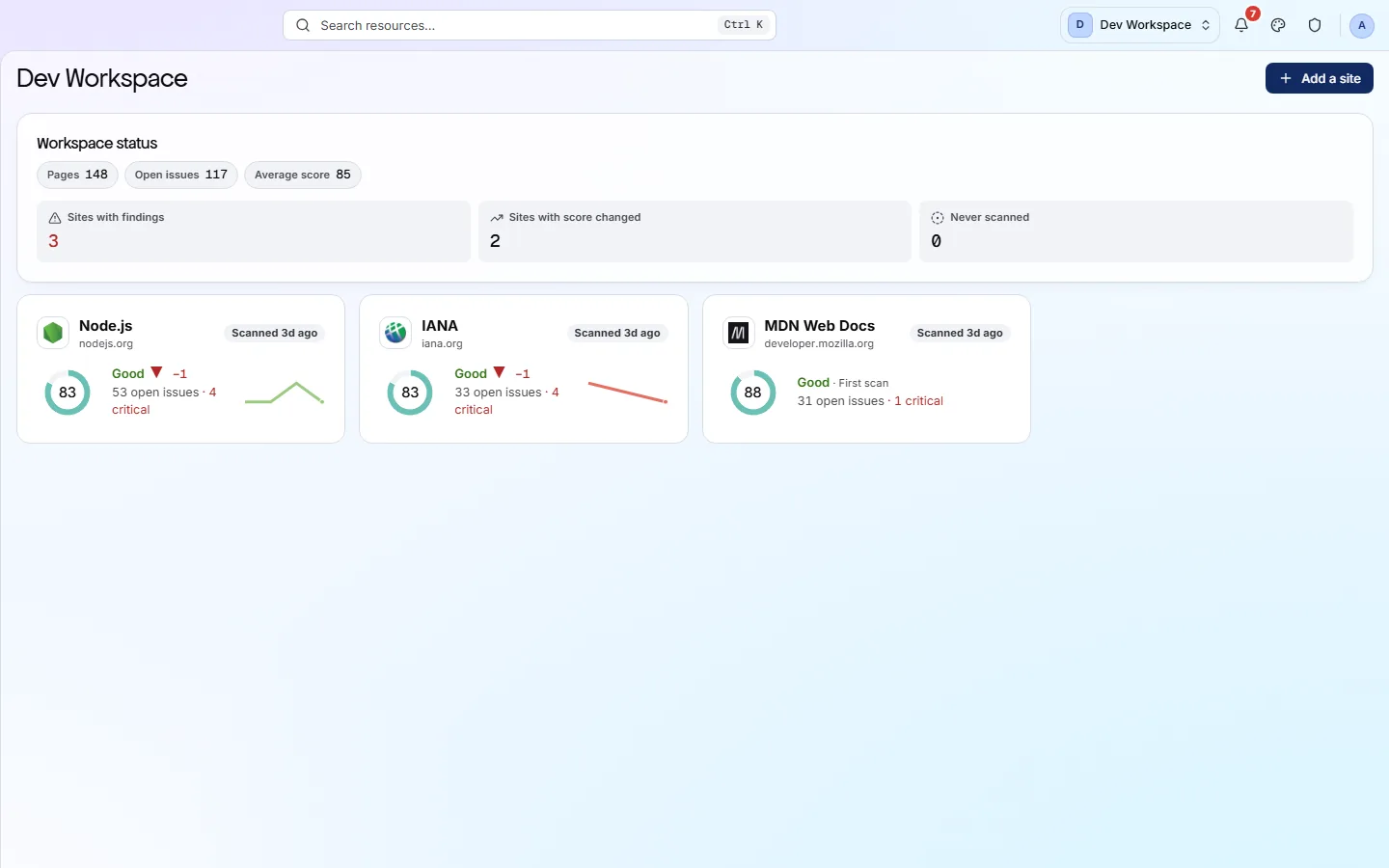
The status strip#
The whole workspace, in six figures.
| Field | What it counts | What it does |
|---|---|---|
| Pages | Every site | The URLs crawled by each site's most recent scan, added up. |
| Open issues | Every site | Failed checks still outstanding across the workspace. |
| Average score | Mean | The average of the site scores. Treat it as a rough guide: a 12-page site counts the same as a 12,000-page one. |
| Sites with findings | Count | How many sites have at least one open issue. |
| Sites with score changed | Count | How many scored differently from their previous scan. Look at these first. |
| Never scanned | Count | Sites you have added but never scanned. Anything above zero is not being watched. |
A card per site#
Enough to decide where to start, without opening anything.
| Field | On the card | What it does |
|---|---|---|
| Score ring | 0-100 | The site's health score from its most recent completed scan. |
| Band and delta | Good ▼ −1 | The band, then the change since the previous scan of the same branch. A first scan says “First scan” instead. |
| Open issues · critical | 53 · 4 critical | Open issues in total, with the critical ones counted separately. |
| Sparkline | Recent scans | How the score has moved across recent scans. |
| Scanned … | Relative | How long ago the last scan finished. |
Click a card to open that site's Overview. To add a site, use the button in the header or the sidebar - see Add a site.
If the product does not match this page, the page is wrong and we would like to know. Tell us