

Every page the scan found
The Pages view lists every URL the scan found, as a table or a folder tree. Filter it to find broken or hidden pages. Open any page for a full report on it.
- full report for every page
- 1
- full report for every page
- views: table and tree
- 2
- views: table and tree
- ways to filter
- 10+
- ways to filter
Status codes
What each page's status tells you
Every page answers with a status code. The strip above the table lets you pick one and see every page that returned it.
- 2xx · OK
The page loaded normally.
Nothing. Check its issues if it has any.
- 3xx · Redirect
The page sends visitors to another address.
Fine for moved pages. Update your own links to point at the new address.
- 4xx · Not found
The page is missing or blocked, such as a 404.
Redirect it to the closest live page, or remove the links to it.
- 5xx · Server error
Your server failed to answer.
Open the page logged out, then check your server logs for that address.
- Not crawled
Found, but not read, often because of your page limit or an exclude rule.
Raise the page limit or check your crawl rules in Settings.
What it shows you
Every URL, and everything about it
The table
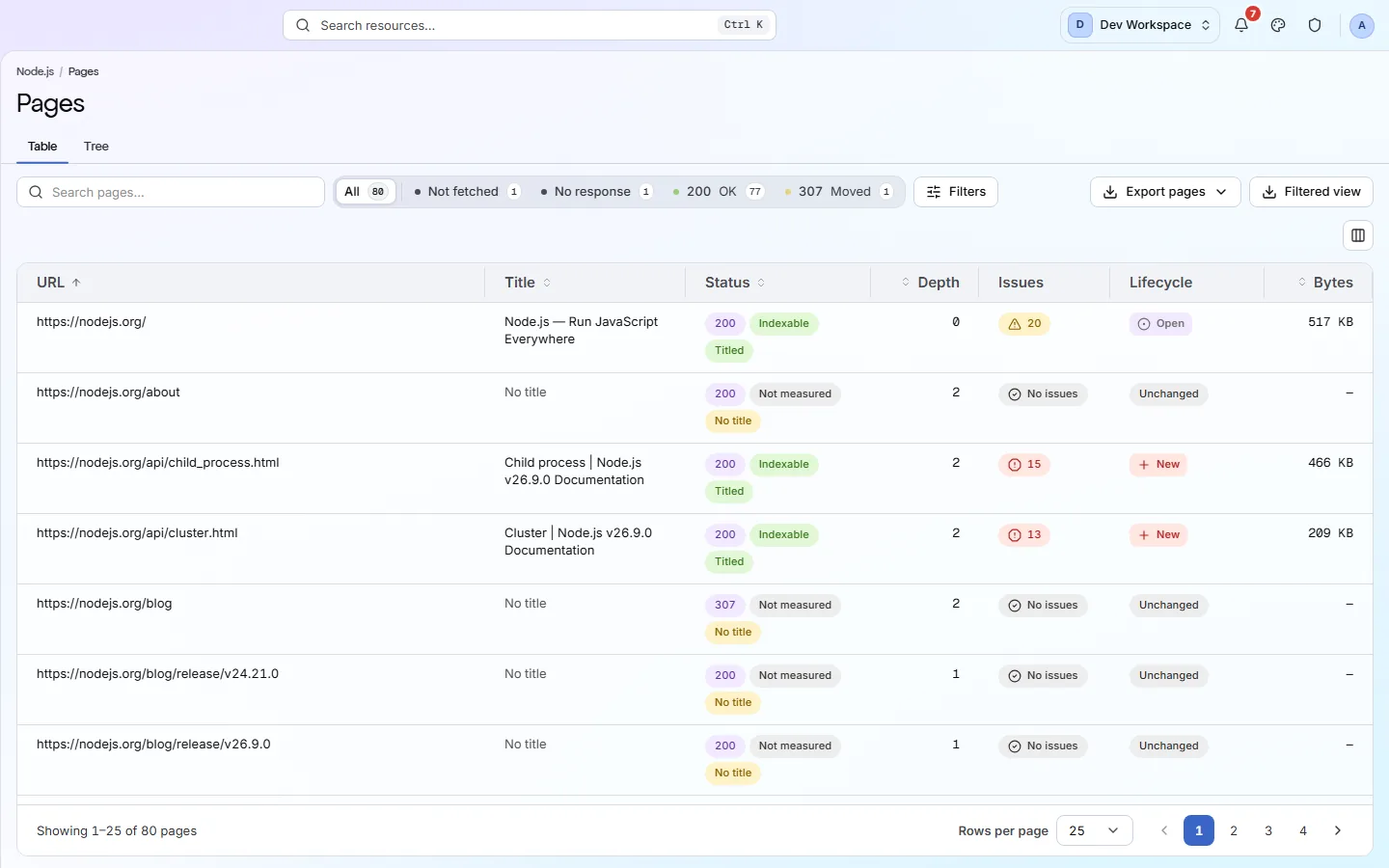
URL, title, status, click depth, issues and size for every page. Sort and filter across the whole scan, not just one screen of rows.
The tree
Your pages grouped into folders, with a count of the pages in each that need a look.
Filters
Narrow by status, severity, sitemap, click depth, indexability, structured data, word count, size, response time and inlinks.
Lifecycle
Each page compared with the last scan: New, Regressed, Resolved, Open or Unchanged.
A full page report
Open any page for ten tabs: Overview, Issues, Content, Links, Images, Social, Schema, AI, Technical and Trust.
Search traffic
From Basic, with Search Console connected, each page's Google clicks and impressions, so you can fix the busiest pages first.
What it finds
Page problems and their fixes
- Critical
Pages return a server error (5xx)
Visitors and search engines get an error instead of your page.
How to fix: Open the page logged out to reproduce it, then read your server logs for that address and time.
- Important
Removed pages return 404 instead of redirecting
Anyone following an old link or bookmark hits a dead end.
How to fix: Redirect the old address with a 301 to the closest live page.
- Important
Pages search engines cannot index
An important page with a noindex tag, a block in robots.txt or a canonical pointing elsewhere will not show up in search.
How to fix: Check the status code, noindex tag, robots.txt rule and canonical on each key page.
- Important
Soft 404: an error page that says “OK”
The page looks missing to people but tells search engines it is fine, so it can get indexed.
How to fix: Return a real 404 or 410 status for pages that no longer exist.
- Important
A page failed to load or timed out
If the scan could not load it, a search engine may not either.
How to fix: Open the page to see the error, and check your server copes when many pages are requested.
Inside the app
From the list to one page's report
Every page with its status, depth, issues and lifecycle, with search and filters above.
Click around: it is a working copy of the screen, filled with our test site's data.
Your first visit
Find broken pages in four steps
- 1
Pick a 4xx code in the status strip to list pages that return errors.
- 2
Set Indexability to Not indexable and check none of those should be in search.
- 3
Switch to Tree to see which folders need the most work.
- 4
Open one of those pages and read its Issues tab.
The checks behind this screen
Check categories shown here
These groups of checks feed the numbers on this screen. Each one is explained on the score page.
On-Page
35 checksThese checks look at each page's title, meta description, headings and URL. They flag any that are missing, empty, duplicated on other pages, too long or too short, including pages with more than one H1, because these are the first things search engines read and show.
Content & Answers
12 checksThese checks find thin pages, near-duplicate pages, leftover placeholder text and content that is hard to read. They also check whether you publish an llms.txt file and whether it follows the format.
Indexability
24 checksA page can be reachable and still be kept out of search results. These checks look at canonical tags, noindex and nofollow rules, pagination and soft 404s (error pages that report success) to show which pages search engines may index. They also catch canonicals that point at broken, redirected or noindexed pages, or that contradict each other.
What this screen is for
The results it is part of
A screen is where you look. These are the things PixyScan does for your site that you see here.
FAQ
Common questions about this feature
Why is a page missing from the list?
Your robots.txt may block it, or an exclude pattern may skip it. Nothing may link to it and it may not be in your sitemap. Or the scan hit your page limit: 500 on Free, 5,000 on Hobby, 10,000 on Basic, 15,000 on Pro.
Does it run JavaScript on my pages?
It can, from Pro up. By default PixyScan reads the HTML your server sends, which is fast. Turn on JavaScript rendering in Settings, Crawl tab, if your pages build their content in the browser. Scans then take about 7.6 times as long.
Does it measure page speed?
Yes, from Hobby up, with your own Google API key. PixyScan tests a sample of pages with Google PageSpeed Insights and records Core Web Vitals (Google's speed and stability scores). Pages outside the sample are marked not sampled.
Can I export the list?
Yes, from Hobby up. Export downloads the pages report for your filters. Filtered view downloads the table exactly as you see it, as a CSV file.
Why does a page show a dash for clicks?
Search Console had no Google Web search data for that address in the last 28 days. Pages are matched to Google's addresses with http, https, www, a trailing slash and tracking parameters ignored. Redirects are not followed, so a page Google knows only by another address shows a dash.
Continue the product tour
Previous and next features
Features follow the order of the app’s menu. See the full list to jump to any of them.
See what is wrong with your site
Add your site and get your score, your to-do list and a fix guide for every problem. Free for one site and 500 pages a month, with no time limit.
Nothing to install · Cancel any time