

Every problem, in the order to fix it
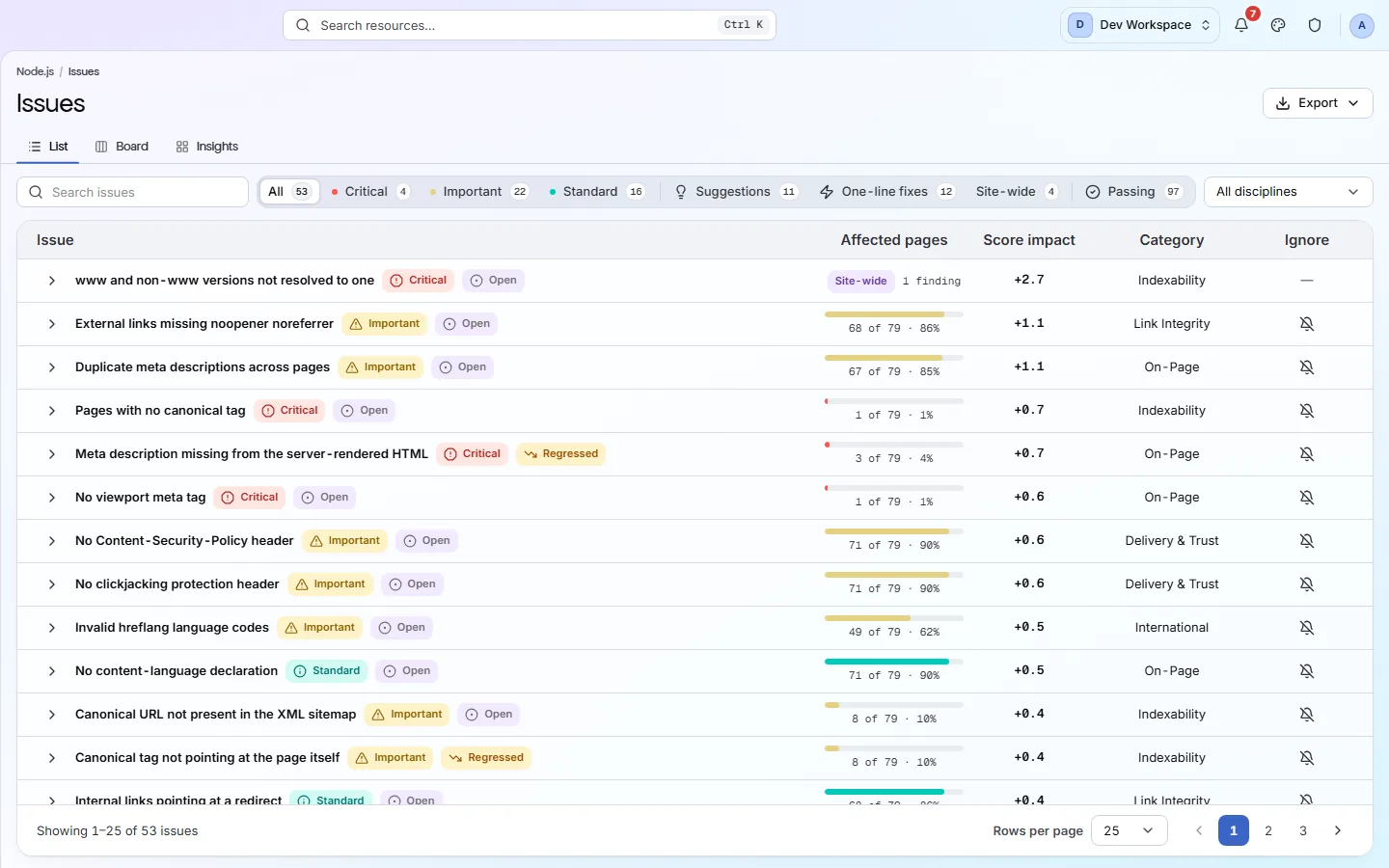
The Issues view lists every check your site fails. The fix worth the most points is at the top. Open any row to see the pages affected and a guide to fixing it.
- checks on every scan
- 200+
- checks on every scan
- check categories
- 10
- check categories
- fix guide for every issue
- 1
- fix guide for every issue
Severity
How serious is each problem?
Every check has a severity. It decides how many points the check can cost, and how soon you should fix it.
- Critical
Stops pages being found, indexed or trusted. Fix these first.
10 points of weight
- Important
Clearly hurts how pages rank or look in search.
5 points of weight
- Standard
Worth fixing, but smaller in effect.
2 points of weight
- Suggestion
Good advice that is not a fault.
Never costs points
Your health score
How a problem costs you points
A failing check costs a quarter of its weight as soon as it fails on any page. The other three quarters grow with the share of pages it fails on. Its category then scales it: crawling and indexing count in full, social tags count least. Fix it everywhere and you win every point back.
See the full scoring method- of the weight charged on the first page
- 25%
- of the weight charged on the first page
- charged when it fails on every page
- 100%
- charged when it fails on every page
- Crawlability and Indexability weight
- 1×
- Crawlability and Indexability weight
- Social & Sharing weight, the lightest
- 0.2×
- Social & Sharing weight, the lightest
Common issues
Problems we find often, and the fix for each
Every issue in the app comes with a How to fix guide written by people. These are a few of the most common, across categories.
- Critical
No XML sitemap found
A sitemap is the list of pages you want search engines to find. Without one, new pages are found slowly.
How to fix: Publish
/sitemap.xmland add aSitemap:line pointing to it in robots.txt. - Critical
Broken internal links
Visitors hit a dead end, and search engines waste their visit on pages that do not exist.
How to fix: Redirect moved pages to their new address with a 301 and update the links. Links in a shared menu or footer are fixed once.
- Critical
Pages have no canonical tag
Search engines have to guess which address is the main one when a page can be reached in several ways.
How to fix: Give every indexable page one
<link rel="canonical">with its full address. - Critical
Pages served over http
Browsers mark the page “Not secure” and visitors lose trust.
How to fix: Install a certificate (Let's Encrypt is free) and redirect every http address to https.
- Important
Duplicate titles across pages
Search engines cannot tell the pages apart and may show the wrong one.
How to fix: Write a unique title for each page, and make templates include the page's own name.
- Important
Images missing alt text
Screen readers have nothing to read out, and search engines cannot tell what the image shows.
How to fix: Add a short description in the
altattribute. Usealt=""for purely decorative images. - Important
Thin content
Pages with very little text rarely answer a question well enough to rank.
How to fix: Expand the page so it answers the question it promises, or merge it into a stronger page.
- Important
Open Graph tags missing
Shared links show up with no picture or the wrong title.
How to fix: Add
og:title,og:description,og:image,og:urlandog:typeto your page template.
Three views
The same issues, three ways
List
Every failing check, ranked by the points you win back. Each row shows severity, pages affected and a New, Regressed or Open badge.
Board
Three lanes of work. Fix now holds every critical issue plus quick one-line fixes. Review holds suggestions.
Insights
Severity charted against how many pages each issue reaches, and which categories cost you the most points.
One issue
Overview, Affected pages, How to fix and About this check. Rescan to verify starts a scan to confirm your fix.
Inside the app
From the list to the fix
Every failing check, the fix worth the most points at the top.
Click around: it is a working copy of the screen, filled with our test site's data.
Your first visit
Clear your first issues in five steps
- 1
Click the Critical pill to see the most serious problems first.
- 2
Look at the top row. If it says Site-wide or hits nearly every page, one change usually fixes it.
- 3
Open the issue and read its How to fix tab.
- 4
Make the change on your site.
- 5
Press Rescan to verify and check the issue has moved to Passing.
The checks behind this screen
Check categories shown here
These groups of checks feed the numbers on this screen. Each one is explained on the score page.
On-Page
35 checksThese checks look at each page's title, meta description, headings and URL. They flag any that are missing, empty, duplicated on other pages, too long or too short, including pages with more than one H1, because these are the first things search engines read and show.
Structured Data
22 checksStructured data is code on a page that tells search engines exactly what the page is, such as a product, an article or an FAQ. These checks validate it for 31 schema.org types, because markup with errors cannot earn rich results.
Delivery & Trust
37 checksThese checks cover HTTPS, SSL certificates (including ones about to expire), outdated TLS versions, security headers, mixed content, compression, render-blocking scripts and page size. On Hobby and above, once you add your own Google API key, they also flag poor Core Web Vitals (Google's measures of loading speed and visual stability) and Lighthouse findings such as unused code, oversized images and short cache times.
Crawlability
18 checksYour robots.txt file and your sitemaps tell search engines which pages to visit. These checks read both, and they flag sitemaps that list broken, blocked or duplicate pages, CSS and JavaScript files that robots.txt blocks, and pages that failed to load during the scan.
What this screen is for
The results it is part of
A screen is where you look. These are the things PixyScan does for your site that you see here.
FAQ
Common questions about this feature
Is this feature included on Free?
Yes. Free runs 181 of the 200+ checks. The other 21 start on Hobby: three check outside links and images (broken outside links, broken images and outside links that redirect), and 18 measure page speed through Google PageSpeed, from Core Web Vitals (LCP, INP, CLS and TTFB) to unused code and oversized images.
Can I hide an issue I don't care about?
Yes. Ignore a check on every page, only on some pages, or on all but some pages. It moves to the bottom with an Ignored badge, but it still costs its full points in your score. Site-wide checks cannot be ignored.
What can I export?
The issues report, as PDF, CSV, XLSX, JSON or Markdown, on every tier. On Free it lists the problems without the fix steps.
Does it fix issues for me?
No. PixyScan never changes your site and does not write content. It finds each problem and explains the fix. You or your developer make the change.
Can I fix the pages with the most search traffic first?
Yes, from Basic, once you connect Google Search Console. An issue's Affected pages tab adds Clicks and Impressions columns: Google Web search over the last 28 days. Click either column to sort by traffic, busiest first. A note above the table says how many of the scan's pages Search Console data matched, such as “matched 812 of 940 pages”. A page with no data shows a dash. Traffic never changes the score or the order of the issues list.
Continue the product tour
Previous and next features
Features follow the order of the app’s menu. See the full list to jump to any of them.
See what is wrong with your site
Add your site and get your score, your to-do list and a fix guide for every problem. Free for one site and 500 pages a month, with no time limit.
Nothing to install · Cancel any time