

Every scan of your site, in one list
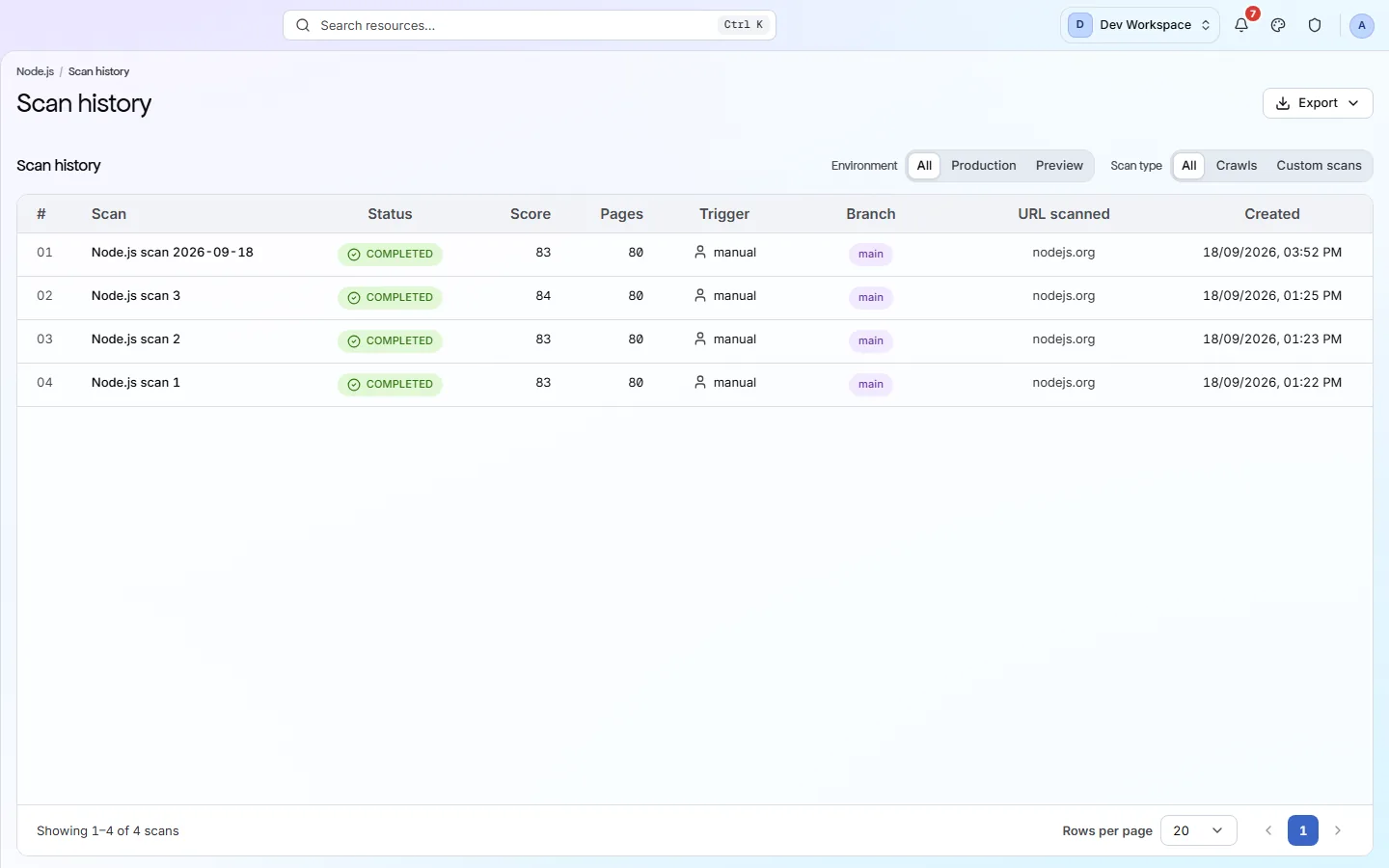
Scan history lists every scan of your site, newest first, with its status and score. Open a past scan and every view shows your site as it was that day.
- of history on Enterprise
- 10 yrs
- of history on Enterprise
- ways a scan can start
- 3
- ways a scan can start
- export formats
- 5
- export formats
What it shows you
A record of every scan you ran
The scan list
Every scan, newest first, with its status, score, page count, what started it, its branch and when it ran. It updates by itself while a scan runs.
Filters
Split your live site from preview branches, and full crawls from custom scans of a list of URLs.
Travel back in time
Open any past scan and every screen shows your site as it was that day, until you press Back to live.
Score history export
From Hobby up, one row per finished scan with its score, pages and issues, as PDF, Excel, CSV, JSON or Markdown.
The Trigger column
What started each scan
- Schedule
A regular scan that ran on its own: daily, weekly or monthly.
Settings, Schedule tab. From Hobby up.
- Manual
Someone pressed Scan now.
The Scan now button on any screen.
- CLI
Your build pipeline started it, usually as part of a release.
Settings, CLI & CI/CD tab. From Basic up.
Inside the app
Every scan, and the day it ran
Every scan with its status, score, pages, trigger and branch.
Click around: it is a working copy of the screen, filled with our test site's data.
Your first visit
Find when your score changed in four steps
- 1
Filter to your live site and to Crawls, so you compare like with like.
- 2
Read down the Score column to find where it changed.
- 3
Open that scan, then use Changes to compare it with the one before.
- 4
Press Back to live when you are done.
What this screen is for
The results it is part of
A screen is where you look. These are the things PixyScan does for your site that you see here.
FAQ
Common questions about this feature
How long are scans kept?
30 days on Free, 180 days on Hobby, 1 year on Basic, 2 years on Pro and 10 years on Enterprise. Older scans are deleted by a nightly clean-up.
Can I re-run an old scan?
No. Each scan is a record of your site on that day and cannot be changed. Press Scan now to scan the site as it is today.
Where do I set up scheduled scans?
In Settings, Schedule tab. Scans can run daily, weekly or monthly in your timezone. Included from Hobby up.
Continue the product tour
Previous and next features
Features follow the order of the app’s menu. See the full list to jump to any of them.
See what is wrong with your site
Add your site and get your score, your to-do list and a fix guide for every problem. Free for one site and 500 pages a month, with no time limit.
Nothing to install · Cancel any time