

Be the tool your AI calls
An agent fixing a website needs two things a human does not: a machine-readable statement of what is wrong, and a check it can run again afterwards to find out whether it worked.
If any two of these are true, this page is for you
None of them is unusual. They are what happens to a site that ships regularly and is only ever looked at deliberately.
- Your coding assistant can edit the site but has no idea what is wrong with it.
- It fixes one thing and breaks another, and nothing tells it either happened.
- Findings live in a dashboard a model cannot open.
- “Improve our SEO” is not a prompt anything can act on without a list.
What PixyScan does
3 things, specifically
Each one is a mechanism in the running product, not a positioning statement.
- 01
A finding is already an instruction
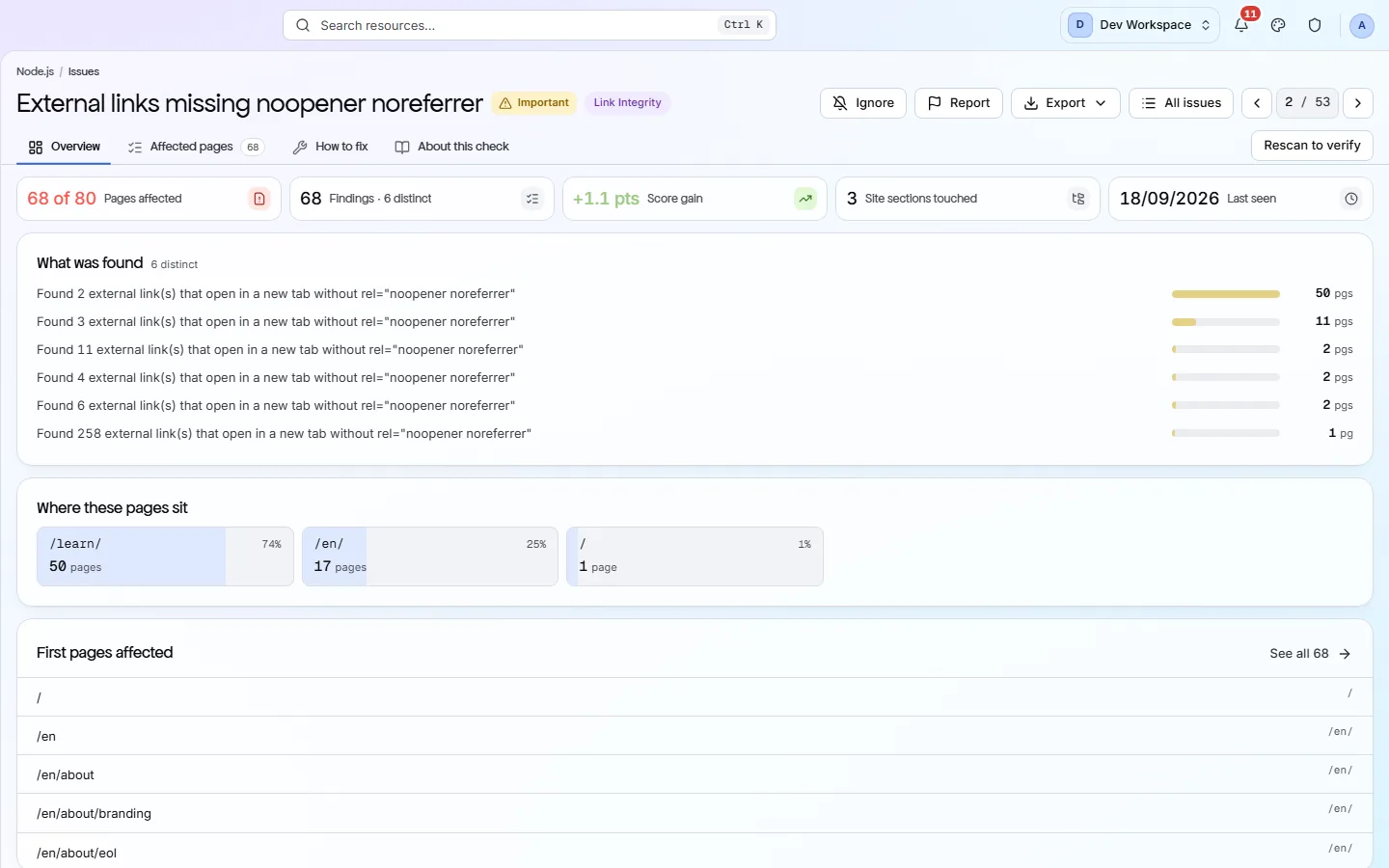
Every check carries a written guide - what it is, why it matters, how to fix it, with examples - and every finding names the exact URLs it applies to. That is the shape an agent needs: a specific defect, a specific location, and a specific remedy.
- 02
Re-run it and read the diff
Scan, fix, scan again. The second run reports what resolved and what appeared, which is the feedback loop an agent needs to know whether its change worked.
- 03
An exit code an agent can branch on
The CLI runs a scan against a URL and exits non-zero below your score threshold - as usable from an agent's shell as from a CI runner.
How it fits your week
Day one, then every week after
When you would actually open it. A tool you have to remember is a tool that gets forgotten, so most of this runs without you.
- Step 1
Day one: one site, one credential, one baseline
Give the agent a per-site client secret rather than a login, and run one scan so there is a baseline. The Issues CSV - one row per finding with check name, severity, reach and URLs - is the shape of a work list an agent can iterate over.
- Step 2
Every change: fix, scan, read the diff
For each finding, the guide beside it is a specific remedy for a specific defect at specific URLs. The agent applies it, runs npx pixyscan-sdk run, and reads the exit code and the log. Resolved means the change worked; New means it broke something else. That is the loop.
- Step 3
Every run: the exit code as the stop condition
Set the site's score floor and, if a particular check must never regress, put it on the fail-on list. An agent that branches on exit code 1 has a stop condition that is not “the model thinks it is done”.
Worth knowing
- We publish an llms.txt for exactly this use, and the file says so.
- CSV, XLSX or JSON export for the issue list, the pages failing one check, and a page's full report.
- Per-site client secrets, so an agent can be given one site and one credential.
- An MCP server on Basic and above: nine tools over OAuth 2.1 with PKCE, including the issue list, the issue detail and the fix guide.
What it will not do for you
- There is no public REST API yet. This is the honest gap on this page: today results come out as a downloaded file, an MCP call or an exit code, not from a documented endpoint you can poll.
- The MCP server reads, and can create a site. There is no tool that starts a scan - that is still the CLI's job.
- Nothing generates a patch for you. The guides are written for a reader - human or otherwise - to act on.
Above the signup button on purpose
What is different four weeks later
Each of these is something you could check, not something you would have to take on trust.
- An agent has a machine-readable list of what is wrong, where, and how to fix it, instead of a prompt that says “improve SEO”.
- Every change is followed by a check that reports what resolved and what appeared.
- The agent holds one credential scoped to one site.
- A hard stop condition - the exit code - that does not depend on the agent's own judgement.
Before you ask
Things people in your position ask first
Plans, edges, and the honest answer to the question this page is most often found by.
Is there an API the agent can call?
Not a public REST API yet, and this is the honest gap on the page. What there is: the CLI's exit code and log, exports as CSV, XLSX, JSON, Markdown or PDF, and an MCP server on Basic and above - nine tools over OAuth 2.1 with PKCE, covering the site's issues, an issue's detail, its fix guide and the checks behind it. It reads, and it can create a site; there is no tool that starts a scan, so the CLI remains the way to run one.
Can the agent read the guides?
Yes, inside the product. Every check's guide renders beside the finding it belongs to, and the MCP server hands the same guide back as a tool call. They are not published as a per-check library on this marketing site. The guides are human-authored prose written to be acted on by a reader, human or otherwise.
Will it write the fix for us?
No. It names the defect, the URLs and the remedy with example markup. Producing the patch is the agent's job, and checking whether it worked is the next scan's.
The screens and capabilities behind this
See what is actually on your site
Point PixyScan at a URL and read the first report in a few minutes. The free plan covers one site and 500 URLs a month - enough to find out whether any of this is true.
No card required · 500 URLs a month on the free plan