

Keep your site safe and trusted
Browsers warn visitors away from sites with expired certificates or unsafe files, and search engines notice too. The Trust view checks your SSL certificate, your security headers and any file still loaded over plain http, on every page.
- early warning before expiry
- 30 days
- early warning before expiry
- security headers checked
- 4
- security headers checked
- views: overview, table, http files
- 3
- views: overview, table, http files
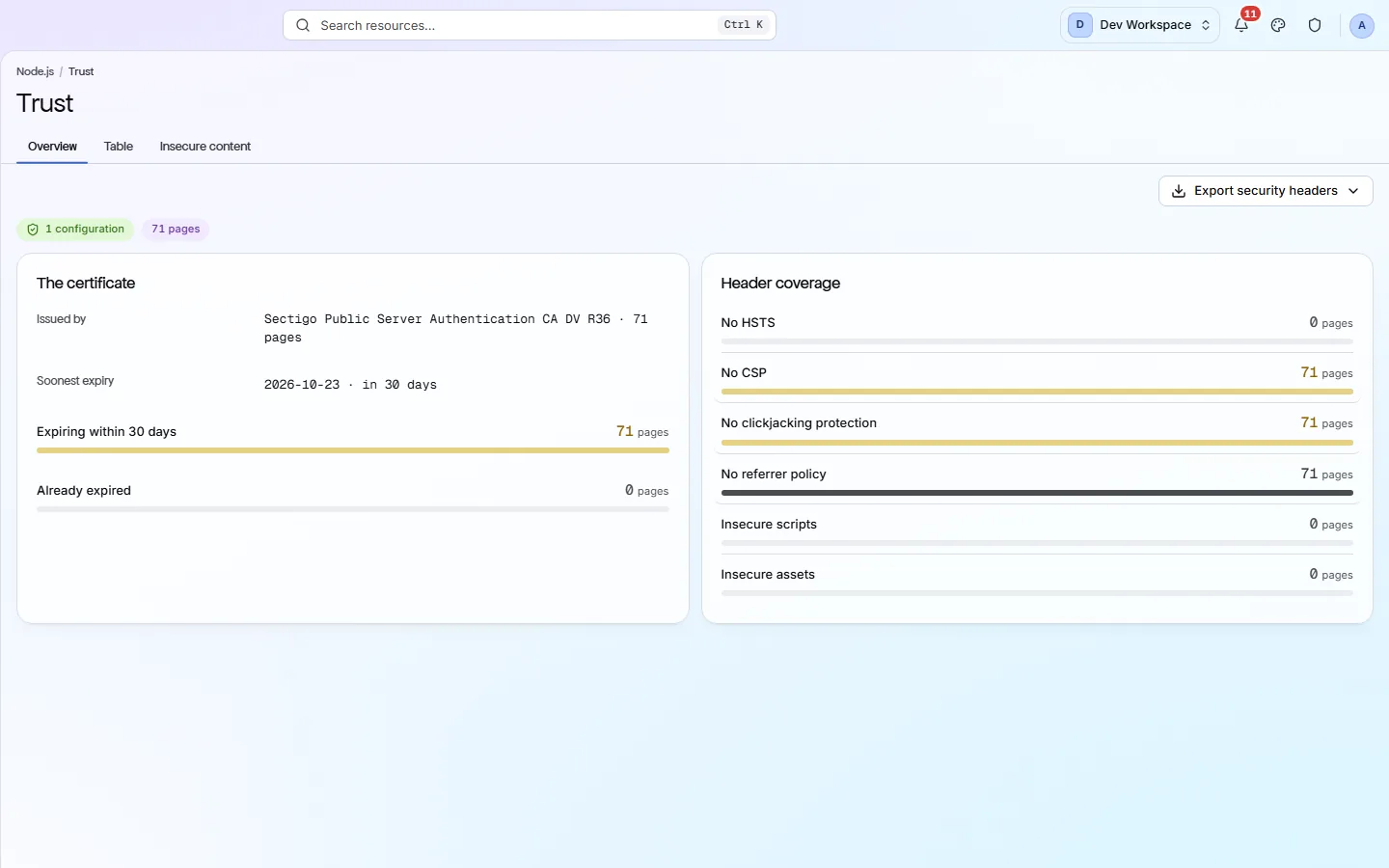
What it shows you
Three things that make a site trusted
The certificate
Who issued it, when it expires, and how many pages expire within 30 days or have already expired. An expired certificate shows visitors a full-page warning.
Header coverage
Security headers are instructions your server sends with every page. The view counts pages missing each one, so you can fix them in your server settings once.
Insecure content
Scripts, images and styles loaded over
http://on a secure page. Browsers block insecure scripts outright and mark the page as not fully secure.
The headers
What each header protects you from
Each one is a single line in your server or CDN settings. Add it once and it covers every page.
- HSTS
Tells browsers to always use https for your site, even if someone types http.
Strict-Transport-Security: max-age=31536000 - CSP
Lists where scripts and files may load from, which blocks most injected code.
Start in report-only mode, then enforce a policy such as
default-src 'self'. - Clickjacking
Stops other sites showing your page inside a hidden frame to trick clicks.
X-Frame-Options: SAMEORIGIN, orframe-ancestorsin your CSP. - Referrer-Policy
Controls how much of your page address is passed on when visitors click away.
Referrer-Policy: strict-origin-when-cross-origin
What it finds
Trust problems, worst first
Certificate and http problems are critical: visitors see them straight away. Missing headers are quieter but just as easy to fix.
- Critical
A page is served over http, not https
Browsers label the page “Not secure”, and anything typed into it can be read on the way.
How to fix: Install a certificate (Let's Encrypt is free) and send every http address to https with a 301 redirect.
- Critical
The SSL certificate has expired
Visitors see a full-page warning and most will leave.
How to fix: Renew the certificate now, reload your server, and turn on automatic renewal.
- Critical
Scripts or styles load over http
Browsers block them, so parts of your page can break or look wrong.
How to fix: Change each
http://address in the Insecure content tab tohttps://. - Critical
Images or other files load over http
The page is marked as not fully secure, and the padlock disappears.
How to fix: Load every image, video and font from an
https://address. - Important
The certificate expires within 30 days
If renewal fails, the site goes behind a warning on the day it expires.
How to fix: Renew early, and check your server or CDN is serving the new certificate.
- Important
HSTS, CSP or clickjacking protection is missing
Without them, your visitors are easier to attack, even if your site itself is fine.
How to fix: Add the header from the table above to your server or CDN settings.
Inside the app
From the certificate to every http file
The certificate's issuer and soonest expiry, and how many pages lack each security header.
Click around: it is a working copy of the screen, filled with our test site's data.
Your health score
Security problems cost real points
Each check is weighted by its severity: Critical 10, Important 5, Standard 2. Trust checks sit in the Delivery & Trust category, which counts at half that weight. Fixing a critical problem on every page wins all of its points back.
How the score works- category weight in the score
- 0.5×
- category weight in the score
- base weight of a critical check
- 10
- base weight of a critical check
- base weight of an important check
- 5
- base weight of an important check
- base weight of a standard check
- 2
- base weight of a standard check
The checks behind this screen
Check categories shown here
These groups of checks feed the numbers on this screen. Each one is explained on the score page.
Delivery & Trust
37 checksThese checks cover HTTPS, SSL certificates (including ones about to expire), outdated TLS versions, security headers, mixed content, compression, render-blocking scripts and page size. On Hobby and above, once you add your own Google API key, they also flag poor Core Web Vitals (Google's measures of loading speed and visual stability) and Lighthouse findings such as unused code, oversized images and short cache times.
FAQ
Common questions about this feature
Does PixyScan change my server settings?
No. It reads the headers and certificate your server sends and tells you what to change. You or your host make the change.
Will it warn me before my certificate expires?
Yes. Pages whose certificate expires within 30 days are flagged as an Important issue on every scan, and the Certificate expiring filter lists them.
Can I export the results?
Yes, from Hobby up. Export security headers or Export insecure content downloads CSV, Excel or JSON.
Continue the product tour
Previous and next features
Features follow the order of the app’s menu. See the full list to jump to any of them.
See what is wrong with your site
Add your site and get your score, your to-do list and a fix guide for every problem. Free for one site and 500 pages a month, with no time limit.
Nothing to install · Cancel any time