

A marketing site that ships every day, checked every time
Your marketing site is in the same repo, on the same pipeline, deployed by the same people as the product. It should be checked the same way too.
If any two of these are true, this page is for you
None of them is unusual. They are what happens to a site that ships regularly and is only ever looked at deliberately.
- The site ships several times a week and nobody reviews it for anything but visual regressions.
- A component refactor dropped the H1 on every pricing variant and it took a quarter to notice.
- Preview deploys get crawled by accident and pollute whatever numbers you were tracking.
- Docs, blog and marketing live on three subdomains with three different sets of habits.
What PixyScan does
3 things, specifically
Each one is a mechanism in the running product, not a positioning statement.
- 01
Wired into the pipeline
One CLI command, one exit code, one per-site secret. The scan runs against the branch's environment URL, so the thing being measured is the thing about to ship.
- 02
Preview branches stay out of the trend
Scans are compared only with the previous scan on the same branch. Map a branch pattern to an environment and a preview run is filed as preview.
- 03
The diff, per release
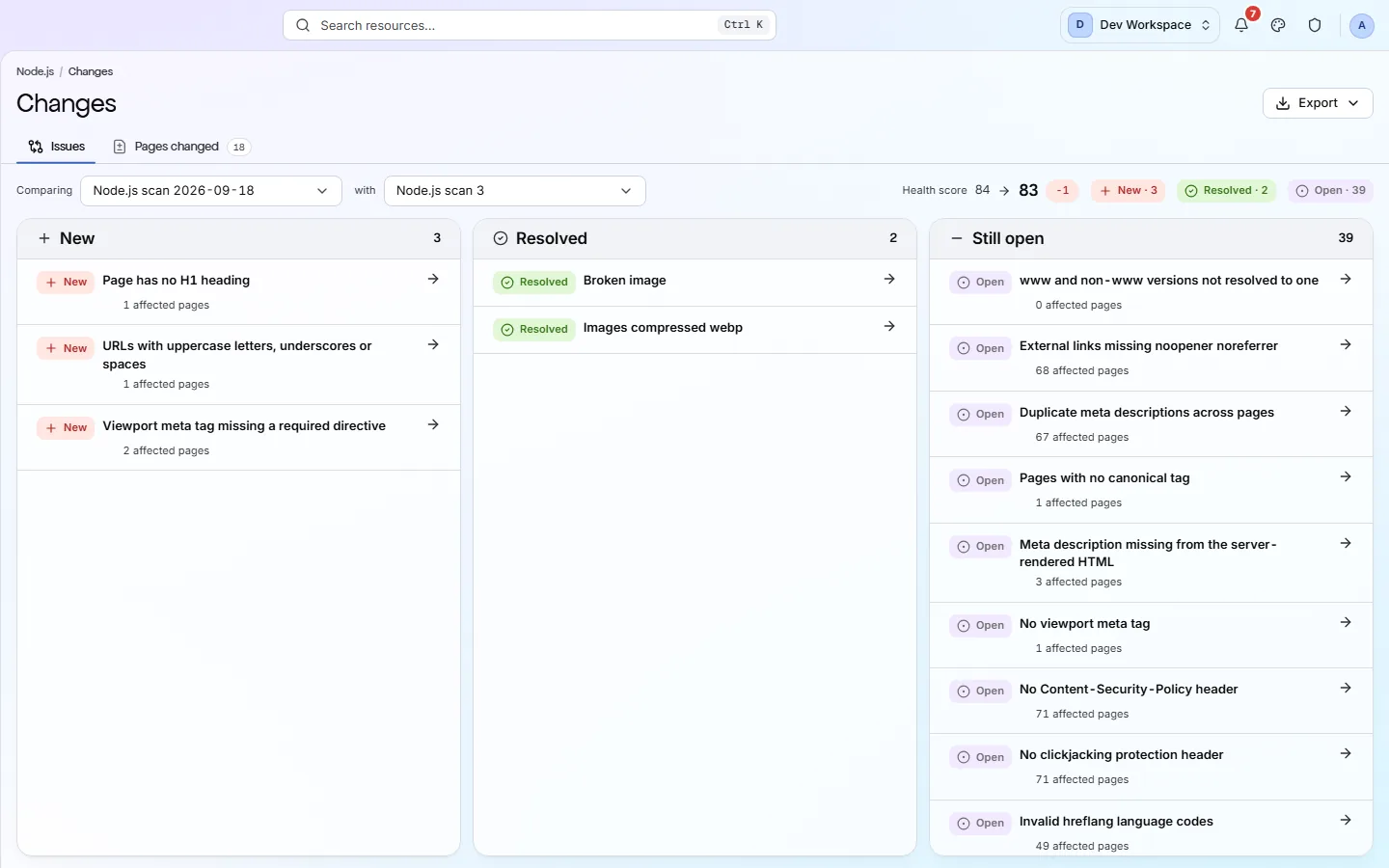
New, resolved and still open since the last run. A release that broke three things says so on the day rather than in the next quarterly review.
How it fits your week
Day one, then every week after
When you would actually open it. A tool you have to remember is a tool that gets forgotten, so most of this runs without you.
- Step 1
Day one: three sites, one pipeline step
Add marketing, docs and blog as separate sites so each gets its own score and history. Issue a secret for the marketing site, map main and the preview pattern, and add the CLI step to the pipeline with the floor set to today's score.
- Step 2
Every pull request: the preview is scanned
The preview deploy is crawled and compared with previous previews. A component change that drops the H1 on every pricing variant fails the check on the pull request, with the URLs in the log, before it is merged.
- Step 3
Every release: read the Changes screen for production
After the deploy, New is what the release changed for the worse and Resolved is what it fixed. Once a month, glance at AI readiness - the marketing site is the one property where being quotable by an answer engine matters most.
Worth knowing
- Sites are separate, so docs, blog and marketing each get their own score and history.
- Two crawl engines per site - fast HTTP, or Playwright executing your JavaScript on Pro and above, for the app shell that renders client-side.
- AI readiness scored per site, which matters more here than almost anywhere else.
- Structured data validated across 22 checks, including FAQ and Article types.
What it will not do for you
- Core Web Vitals need your own Google API key and start on Hobby. Pages are sampled against a per-scan budget, and the ones that were not sampled say so rather than showing a guess.
- No GitHub app - the gate is an exit code your pipeline chooses to act on.
Above the signup button on purpose
What is different four weeks later
Each of these is something you could check, not something you would have to take on trust.
- The marketing site is checked on every merge, the same way the product is.
- Preview deploys never appear in production's history.
- Docs, blog and marketing each have a score, a schedule and a Changes screen of their own.
- The team learns about a metadata regression from a red check rather than from a quarterly review.
Before you ask
Things people in your position ask first
Plans, edges, and the honest answer to the question this page is most often found by.
We use a static site generator. Does it still apply?
Especially then. Static HTML is exactly what the crawler reads, so what it reports is what every crawler receives. A build-time regression in a layout component is the canonical case for the CI gate.
What about subdomains and paths?
Each site is a URL, so docs.example.com and example.com/blog can each be their own site with their own settings, budget and schedule - or one site if you would rather have one score.
Does it measure Core Web Vitals?
Yes, on Hobby and above, with your own Google API key - PageSpeed Insights gives the Lighthouse lab run and CrUX gives real-user field data. LCP, INP, CLS, TTFB and FCP, plus the performance score out of 100, and a poor LCP, a poor CLS or a slow TTFB raises a real finding under Delivery & Trust. Pages are sampled against a per-scan budget; the ones that were not sampled say so rather than showing a guess.
The screens and capabilities behind this
See what is actually on your site
Point PixyScan at a URL and read the first report in a few minutes. The free plan covers one site and 500 URLs a month - enough to find out whether any of this is true.
No card required · 500 URLs a month on the free plan