

See how your links look when people share them
When someone pastes your link into LinkedIn, Slack, WhatsApp or X, the preview card comes from a few tags in your page's code. The Social view shows which pages would share as a bare link with no image, and exactly which tags are missing.
- social checks
- 13
- social checks
- table filters
- 12
- table filters
- card previews per page
- 2
- card previews per page
What it shows you
Your share cards, before anyone shares them
A link with a big image, a clear title and a short description gets far more clicks than a bare URL. These are the tags that build that card.
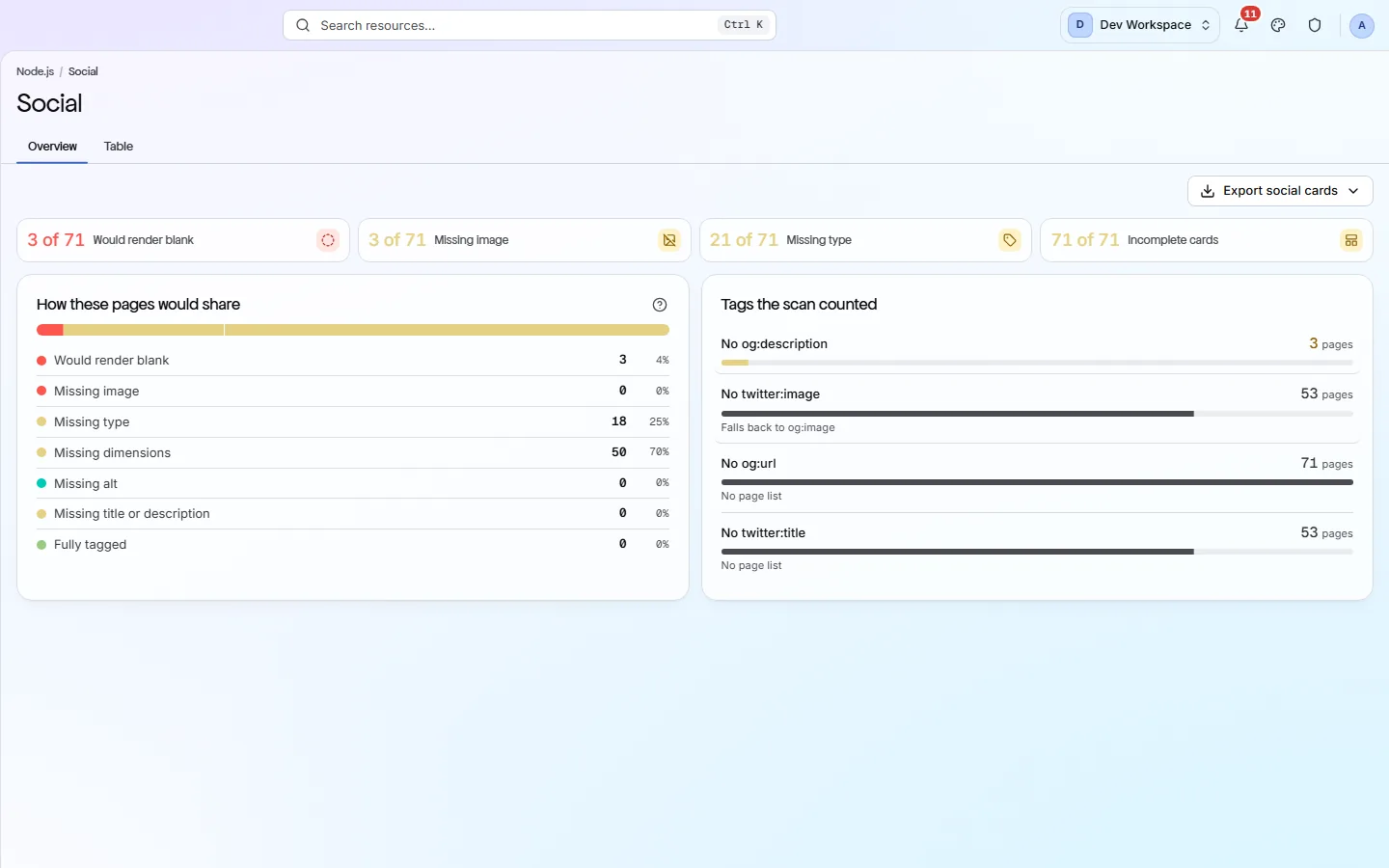
Would render blank
Pages with no
og:imageand notwitter:image. Shared anywhere, they show up as plain text with no picture.How pages would share
One bar puts each page under its worst problem: blank, missing image, missing type, missing size, missing alt, missing text, or Fully tagged.
Tags the scan counted
How many pages lack
og:description,twitter:image,og:urlandtwitter:title, so you know which tag to add first.A table of every page
Each page's share title, image size and type. Expand a row to see every Open Graph and Twitter tag exactly as declared.
The tags
Five tags make a good share card
Open Graph tags are read by Facebook, LinkedIn, Slack and most chat apps. X reads its own Twitter tags and falls back to Open Graph.
- og:title
The bold headline on the card.
Keep it short and clear. It can differ from the page title.
- og:description
One or two lines under the headline.
Say why the reader should click.
- og:image
The large picture. Without it the card is blank.
Use a full https address. 1200 × 630 pixels suits most sites.
- og:url
The page's main address, so shares of different versions count as one.
Use the same address as the page's canonical tag.
- twitter:card
The card style on X.
summary_large_imageshows the big picture.
What it finds
Fix a blank share card in minutes
Most social fixes are one change to your page template, which fixes every page at once.
- Important
Open Graph tags are missing
Without them, sites guess the title and picture, or show nothing at all.
How to fix: Add
og:title,og:description,og:image,og:urlandog:typeto the<head>of your page template. - Important
The share image has no width and height
Some apps will not show the image on the first share until they have downloaded it.
How to fix: Add
og:image:widthandog:image:heightwith the image's real size. - Important
The homepage has no site name or locale
og:site_namelabels the card with your brand, andog:localesays which language it is in.How to fix: Add
og:site_nameandog:locale(such asen_GB) to your homepage. - Important
Articles have no publish date or author
Article cards use these to show when and by whom a post was written.
How to fix: Add
article:published_time,article:modified_timeandarticle:authorto article pages. - Standard
Twitter Card tags are missing
X falls back to Open Graph, but without
twitter:cardit may pick the small card.How to fix: Add
twitter:cardset tosummary_large_image, plus a title, description and image. - Suggestion
The share image has no alt text
Screen readers describe the image using this text. It never costs points.
How to fix: Add
og:image:altwith a short description of the picture.
Inside the app
Spot it, then filter to it
Four tiles and one bar show how many pages would share badly, and why.
Click around: it is a working copy of the screen, filled with our test site's data.
Your health score
Social tags count, but lightly
Share cards do not change your ranking in Google, so the Social & Sharing category counts at 0.2 of its full weight, the lightest of all. They still change how many people click a shared link, so they are worth fixing.
How the score works- category weight in the score
- 0.2×
- category weight in the score
- social checks
- 13
- social checks
- of them are suggestions, worth 0 points
- 4
- of them are suggestions, worth 0 points
- card previews on each page report
- 2
- card previews on each page report
The checks behind this screen
Check categories shown here
These groups of checks feed the numbers on this screen. Each one is explained on the score page.
Social & Sharing
13 checksOpen Graph and Twitter tags set the title, description and image shown when someone shares your link. These checks make sure each one is present and set correctly, so a shared link does not appear blank or broken.
FAQ
Common questions about this feature
Where can I preview a share card?
Click any page in the Table. Its own report opens on the Social tab, with an Open Graph preview (Facebook, LinkedIn, Slack and most apps) and an X preview.
Does it load my share images?
No. The table shows each image's address and declared size. It does not download the images.
Can I export the list?
Yes, from Hobby up. Export social cards downloads one row per page with all its Open Graph and Twitter tags, as CSV, Excel or JSON.
Continue the product tour
Previous and next features
Features follow the order of the app’s menu. See the full list to jump to any of them.
See what is wrong with your site
Add your site and get your score, your to-do list and a fix guide for every problem. Free for one site and 500 pages a month, with no time limit.
Nothing to install · Cancel any time