

Stop re-auditing the same site every quarter
You already know what is wrong with the site. What you cannot see is which of it appeared last Tuesday, and that is the only part anyone can be held to a deadline on.
If any two of these are true, this page is for you
None of them is unusual. They are what happens to a site that ships regularly and is only ever looked at deliberately.
- The quarterly audit returns 200 findings, 190 of which were in the last one.
- A deploy broke something in March and you found it in June, from a traffic chart.
- Engineering asks “which of these actually matters” and the honest answer is a spreadsheet.
- Your research tool tells you what to target. Nothing tells you what your own site is doing.
What PixyScan does
3 things, specifically
Each one is a mechanism in the running product, not a positioning statement.
- 01
A diff instead of a list
Every scan is compared with the previous one on the same branch and split into new, resolved and still open. The four that appeared this week are the work; the 199 you already knew about stay out of the way.
- 02
A work list ordered by what the fix is worth
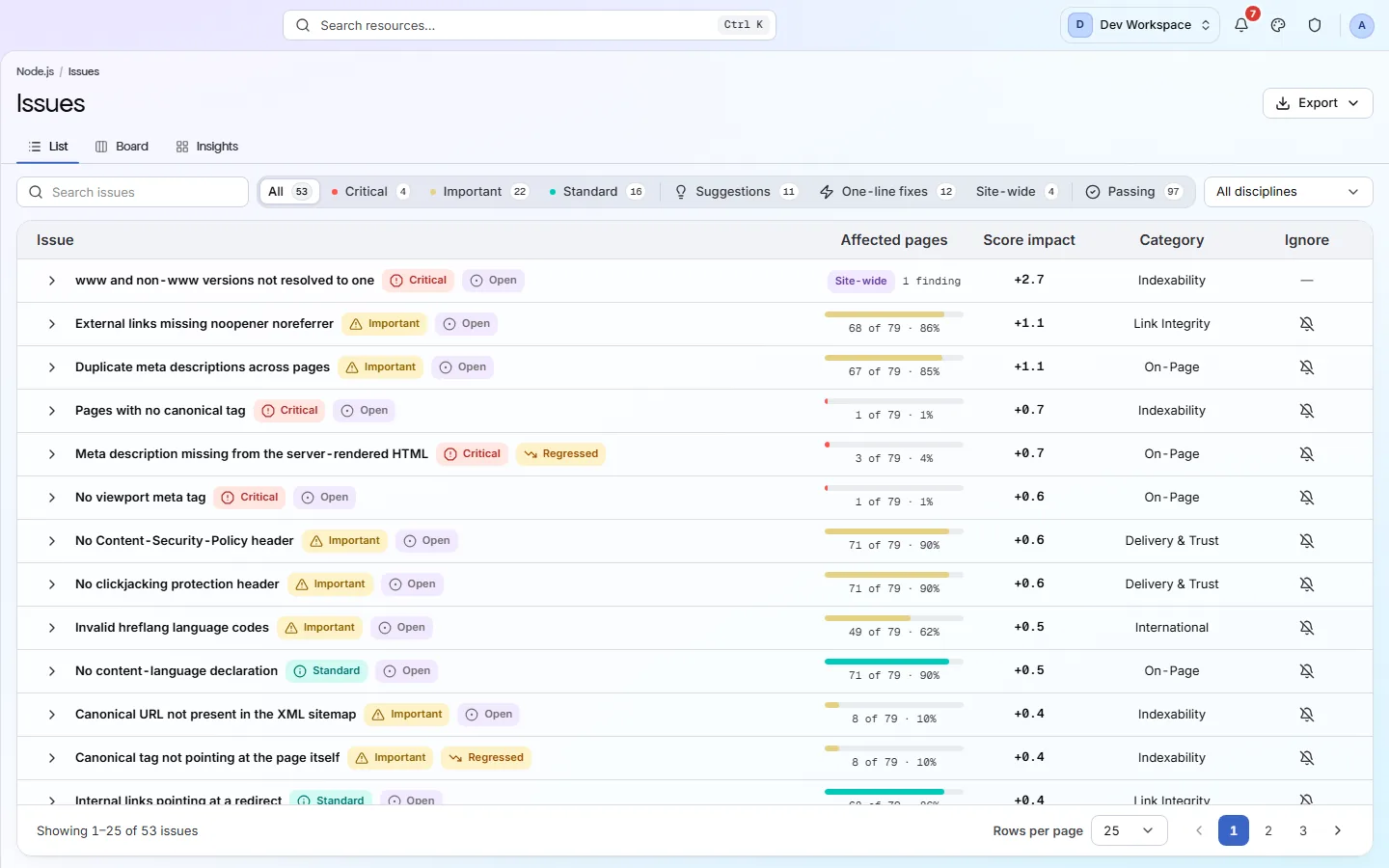
Severity, how many pages it reaches, and the score you get back. The list is ordered by what each fix wins back, so the top of it is the afternoon's work, with the exact URLs attached.
- 03
Something to hand engineering
Every finding names the pages it was found on and carries a written guide to fixing it. Export the list to CSV, or render the run as a PDF.
How it fits your week
Day one, then every week after
When you would actually open it. A tool you have to remember is a tool that gets forgotten, so most of this runs without you.
- Step 1
Day one: run the baseline and prioritise it
Connect the site, let the first scan finish, and sort the Issues list by impact. Filter to Site-wide for the findings that are one fix each, then to Critical. Export the filtered list as CSV and that is the ticket for engineering - with URLs, not adjectives.
- Step 2
Every week: read the Changes screen, not the list
Put the site on a weekly schedule. The Monday ritual becomes three columns: what appeared since last week, what your fixes resolved, and what is still open. New is the conversation with engineering; Resolved is the evidence for your own stand-up.
- Step 3
Every quarter: the audit writes itself
The Full PDF of the latest run, beside the one from the start of the quarter, is the quarterly review. The trend chart on the overview shows the score's path between them, and Still open is the backlog for the next one, already ranked.
Worth knowing
- Filter to Critical, One-line fixes, or Site-wide - three different kinds of afternoon.
- “120 of 120 · 100%” beside “55 of 120 · 46%” tells you template bug from one bad page.
- Scan history keeps every run, so you can read the site as it was the day before something broke.
- Works alongside Semrush or Ahrefs rather than instead of them - different job.
What it will not do for you
- No keyword research, rank tracking, backlinks or competitor data. Keep the research tool you have.
- Alerts cover four events - scan completed, scan failed, score decreased, new critical issue. There is no subscription to one particular check, and no scheduled report delivery: the PDF is a download.
Above the signup button on purpose
What is different four weeks later
Each of these is something you could check, not something you would have to take on trust.
- A finding is discovered the week it appears rather than the quarter it is noticed in a traffic chart.
- Engineering receives a list with URLs and a written fix per check, and stops asking which of two hundred items matters.
- Every fix has a Resolved row against it, so progress is something you can point at rather than assert.
- The quarterly audit becomes a comparison of two runs rather than a week of re-crawling the same site.
Before you ask
Things people in your position ask first
Plans, edges, and the honest answer to the question this page is most often found by.
Does this replace our crawler?
For the recurring technical audit, yes - that is what it is. For keyword research, rank tracking and backlinks, no; keep the research tool you have, and let this one watch the site you already own.
How does the score relate to rankings?
It does not claim to. The score measures the state of your markup and structure against the check catalogue, with the formula published. It is a number you can move with a deploy, which is precisely what makes it useful to a team and unlike a ranking.
Can I show a client or a stakeholder without giving them the product?
Export the run as a PDF in the Strengths or Full cut. If they want to look themselves, add them as a member of that one site with a read-only role.
The screens and capabilities behind this
See what is actually on your site
Point PixyScan at a URL and read the first report in a few minutes. The free plan covers one site and 500 URLs a month - enough to find out whether any of this is true.
No card required · 500 URLs a month on the free plan