

Find the images that need fixing
The Images view puts every image the scan found into one gallery. It shows which are missing alt text, broken, too heavy or in an older format, and which pages use each one.
- where an image counts as heavy
- 200 KB
- where an image counts as heavy
- quick filters
- 4
- quick filters
- fix per image file
- 1
- fix per image file
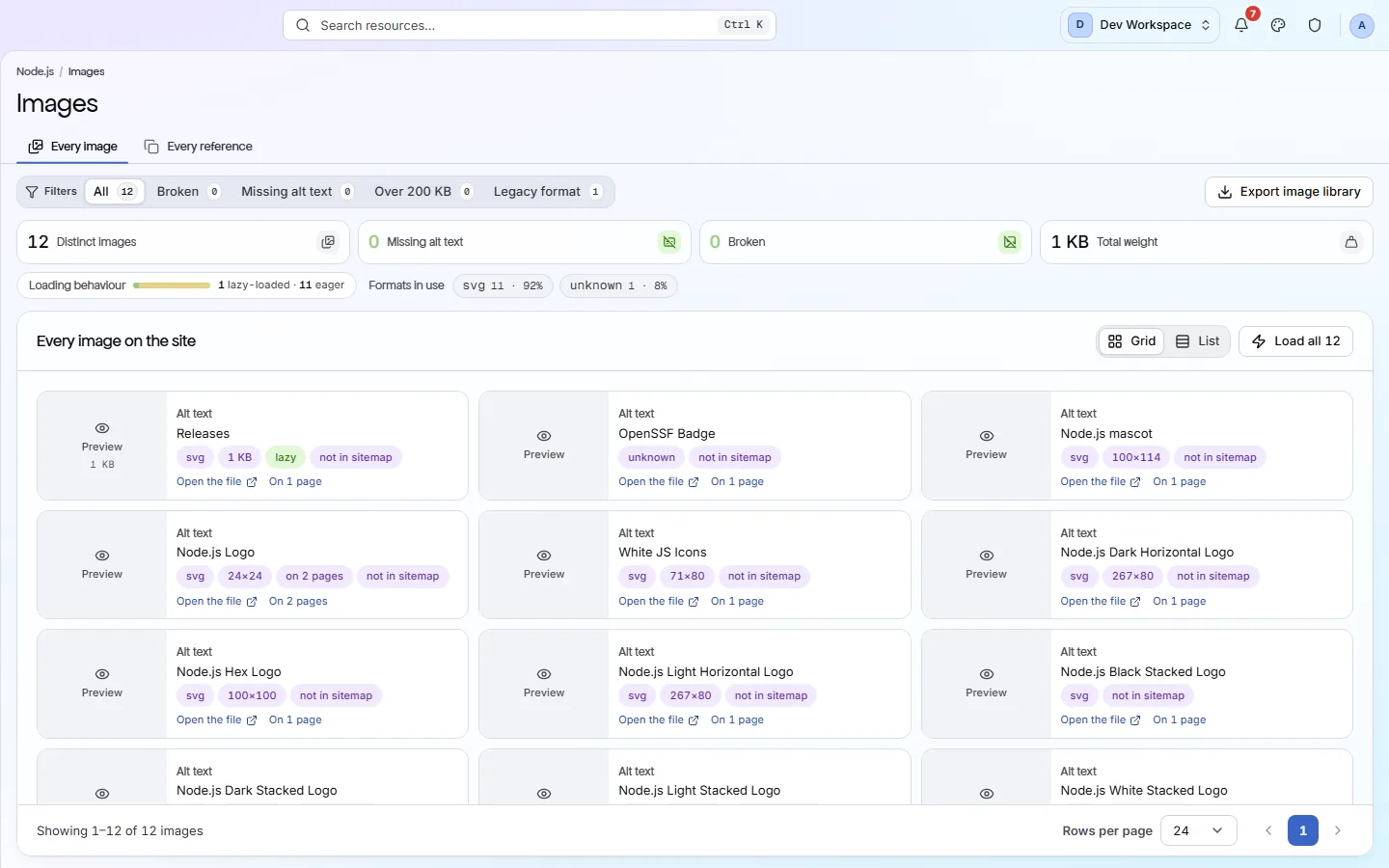
What it shows you
Every image on your site, in one gallery
Each file is listed once, so a logo used on every page is one fix, not hundreds.
Image cards
A preview of each image with its alt text, format, size, file weight and how many pages use it.
Four filters
Broken, Missing alt text, Over 200 KB and Legacy format, each with a count. Press one to see only those images.
Every reference
One row for each image on each page, which is where you see exactly which pages need alt text.
Pages using it
Open an image's page count to see every page it appears on, so you know where a change will show.
Formats
Old formats make pages heavier
Modern formats are often much smaller for the same picture, which makes pages load faster.
- WebP · AVIF
Modern formats, small files with good quality.
Nothing. Use these for new photos.
- SVG
Drawn shapes, such as logos and icons, sharp at any size.
Nothing. Ideal for logos and icons.
- JPEG · PNG · GIF
Older formats. They work everywhere but are often larger.
Convert to WebP or AVIF, with the old file kept as a fallback.
What it finds
Image problems and their fixes
- Critical
Images that fail to load
Visitors see a broken image icon where your picture should be.
How to fix: Fix the file path or restore the file. Start with images in your templates, which appear on many pages.
- Important
Images missing alt text
Screen readers have nothing to read out, and search engines cannot tell what the image shows.
How to fix: Add a short description in the
altattribute. Usealt=""for purely decorative images. - Important
Images missing width and height
The page jumps as each image loads, because the browser does not know how much space to keep.
How to fix: Add
widthandheightto every<img>tag. - Standard
Images not in WebP or AVIF
Older formats make pages heavier and slower. Flagged when most images on a page with five or more are old formats.
How to fix: Serve WebP or AVIF in a
<picture>element, with JPEG or PNG as a fallback. - Standard
Images larger than they are shown
A huge image squeezed into a small space wastes download time. Measured with Google PageSpeed, from Hobby up.
How to fix: Serve smaller versions with
srcset, so each screen gets a size that fits. - Suggestion
Image file names say nothing
A name like IMG_0042.jpg tells search engines nothing. This never costs points.
How to fix: Rename files to describe the picture, such as
red-running-shoe.jpg.
Inside the app
From the gallery to every page
Every image file once, with summary cards for missing alt text, broken images and total weight.
Click around: it is a working copy of the screen, filled with our test site's data.
Your first visit
Fix your images in four steps
- 1
Press Missing alt text and start with the image used on the most pages.
- 2
Switch to Every reference to see which pages need alt text.
- 3
Press Over 200 KB and compress or resize the largest files.
- 4
Press Broken and fix or remove images that no longer load.
The checks behind this screen
Check categories shown here
These groups of checks feed the numbers on this screen. Each one is explained on the score page.
Media
8 checksThese checks look at each image's alt text, size, format and file name, and flag images that are too heavy or in an older format. On Hobby and above they also find images that no longer load.
What this screen is for
The results it is part of
A screen is where you look. These are the things PixyScan does for your site that you see here.
FAQ
Common questions about this feature
Does it find images added by JavaScript?
By default it lists images in the HTML your server sends. From Pro up, turn on JavaScript rendering in Settings, Crawl tab, to catch images your scripts add. Scans then take about 7.6 times as long.
Why do some cards say “Not measured”?
Weighing an image and testing that it loads needs an extra request per file. Those requests start on Hobby. On Free, weight and Broken read “Not measured” rather than a misleading zero. Alt text and format are checked on every tier.
Does this feature affect my health score?
No, this feature only shows what the scan found. Image problems such as missing alt text are scored by the Media checks in the Issues view.
Continue the product tour
Previous and next features
Features follow the order of the app’s menu. See the full list to jump to any of them.
See what is wrong with your site
Add your site and get your score, your to-do list and a fix guide for every problem. Free for one site and 500 pages a month, with no time limit.
Nothing to install · Cancel any time