

Check the words search engines read first
The Content view checks the title, description, headings and word count of every page in one place. It shows which are missing, copied from another page, too long or too short, and which pages are thin or hard to read.
- views of your content
- 5
- views of your content
- filters in the table
- 16
- filters in the table
- every heading listed
- H1–H6
- every heading listed
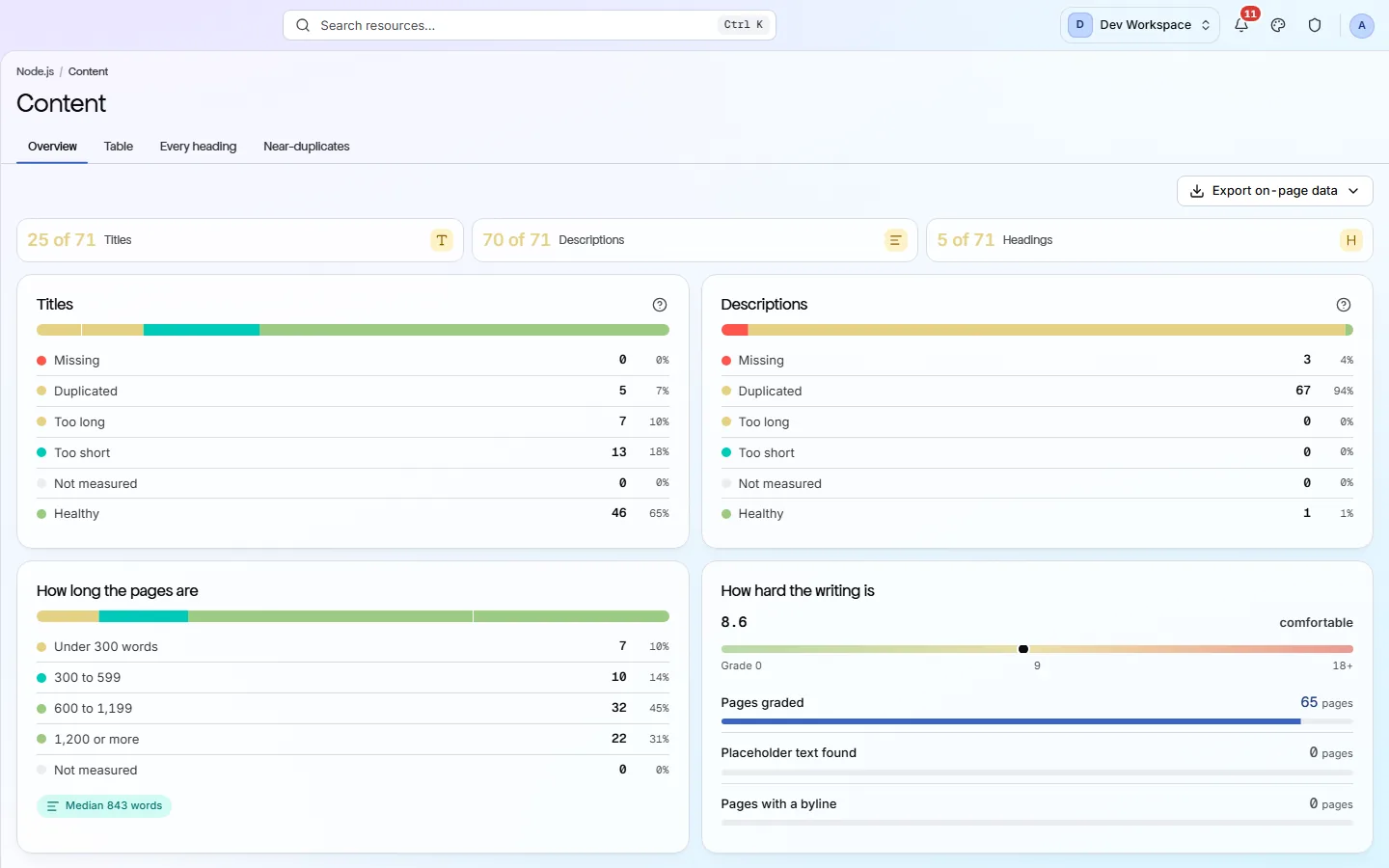
What it shows you
Everything a page says about itself
The title is the blue link in Google. The description is the grey text under it. Headings and body text tell search engines what the page is about. This view checks all of them on every page.
Titles
Each page's
<title>, sorted into Missing, Duplicated, Too long, Too short and Healthy. A copied title makes two pages compete for the same search.Descriptions
The meta description under your link in search results. Missing ones are filled in by Google, often with text you would not have picked.
Headings
Each page's outline from H1 to H6. The view flags pages without exactly one H1 and outlines that skip a level, such as H2 straight to H4.
Word count
Pages grouped from “Under 300 words” to “1,200 or more”, with the median for your site. Short pages often answer too little to rank.
Readability
A reading grade for each page, from easy to hard going, plus pages where placeholder text such as lorem ipsum was left in.
Near-duplicates
Pages whose body text is almost the same as another page, with the closest match as a percentage.
What it finds
Common content problems, and how to fix them
These are the content checks that cost you the most points. Each one is listed in the Issues view with the exact pages and a step-by-step guide.
- Critical
A page has no title
Without a title, search engines make one up from the page, and your link in search results looks wrong.
How to fix: Add a unique
<title>inside<head>on every page. Name the page's topic first and your brand last. - Critical
A page has no meta description
Google writes its own snippet instead, which is often a random line from the page and gets fewer clicks.
How to fix: Add a
<meta name="description">that sums up the page in one or two sentences, like a short advert. - Important
Several pages share one title or description
Search engines cannot tell the pages apart, so they may show the wrong one or none.
How to fix: Write a unique title and description for each page. If a template repeats them, make it include the page's own name.
- Important
A page has no H1 heading
The H1 is the main heading. Without it, readers and search engines lose the clearest sign of what the page is about.
How to fix: Add exactly one H1 that names the page's topic, near the top of the page.
- Important
Thin content
Pages with very little text rarely answer a question well enough to rank.
How to fix: Expand the page so it fully answers what it promises, or merge it into a stronger page and redirect it.
- Important
Two pages are near-duplicates
Search engines pick one version and may ignore the other, or pick the one you did not want.
How to fix: Choose the page that should rank and point the copy at it with a
rel="canonical"tag, or merge the two. - Standard
Heading levels are skipped
Jumping from H2 to H4 breaks the outline that screen readers and search engines follow.
How to fix: Change the heading to the right level and use CSS to change how it looks instead.
- Standard
Placeholder text left on the page
Lorem ipsum on a live page looks unfinished to visitors and tells search engines the page is not ready.
How to fix: Search the page for the placeholder text and replace it with real copy.
Inside the app
Five views of your content
Real captures of the Content screen, from a scan of our test site.
The overview sorts every title and description into five groups. Click a group to see the pages in it.
Click around: it is a working copy of the screen, filled with our test site's data.
Your first visit
Fix your content in four steps
- 1
Open the Titles bar and click Missing. Give each page in the list its own title.
- 2
Do the same for Descriptions, then for Duplicated.
- 3
Open the Table, click Thin content, and expand or merge the shortest pages.
- 4
Check Near-duplicates and pick one page to keep from each pair.
The checks behind this screen
Check categories shown here
These groups of checks feed the numbers on this screen. Each one is explained on the score page.
On-Page
35 checksThese checks look at each page's title, meta description, headings and URL. They flag any that are missing, empty, duplicated on other pages, too long or too short, including pages with more than one H1, because these are the first things search engines read and show.
Content & Answers
12 checksThese checks find thin pages, near-duplicate pages, leftover placeholder text and content that is hard to read. They also check whether you publish an llms.txt file and whether it follows the format.
FAQ
Common questions about this feature
Why does the count here differ from the Issues view?
This view uses its own ranges to sort pages, such as titles of 30 to 60 characters and thin pages under 300 words. The scored checks in Issues use their own limits. Use this view to explore and Issues to see what costs points.
Does this view change my health score?
Not by itself. Missing titles, duplicate descriptions, missing H1s and thin pages are also scored checks, and those show in the Issues view. Title and description length are suggestions and never cost points.
Does it write content for me?
No. PixyScan never changes your site or writes copy. It shows what is missing or weak, and you write the fix.
Can I export the list?
Yes, from Hobby up. The Export button follows the chip you picked, such as title faults or thin pages, and downloads CSV, Excel or JSON.
Continue the product tour
Previous and next features
Features follow the order of the app’s menu. See the full list to jump to any of them.
See what is wrong with your site
Add your site and get your score, your to-do list and a fix guide for every problem. Free for one site and 500 pages a month, with no time limit.
Nothing to install · Cancel any time