

Find out whether AI search can read your site
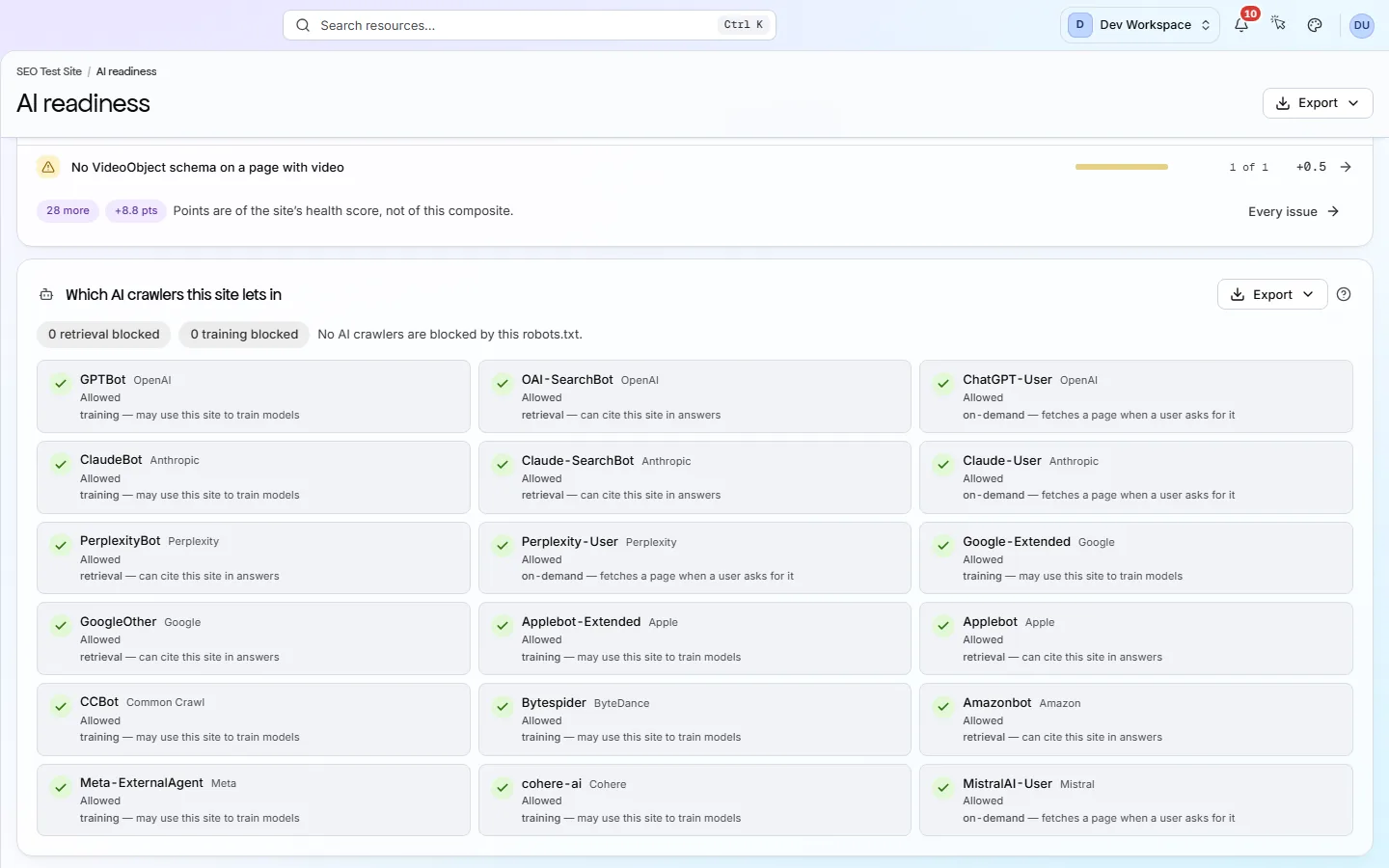
Every scan gives your site an AI readiness score out of 100. It also shows which of 18 AI bots from 11 companies your robots.txt allows or blocks, grouped by what each bot is for, and it checks your llms.txt file.
Does this sound familiar?
ChatGPT, Perplexity and Claude answer questions by reading pages like yours. If their bots are blocked, or your pages are hard for a machine to follow, you are left out of the answer.
- People ask an AI tool where they used to search, and you do not know whether it can read your pages.
- A robots.txt rule written years ago may be blocking the bots that fetch pages for AI answers.
- Advice about AI search is mostly guesswork. You want to know what on your own site you can fix.
How it works
How it works, in three steps
Every scan scores how well AI tools can read your site, and shows which AI bots you allow or block.
- Step 1
Run a scan
AI readiness is part of every scan. There is nothing extra to switch on.
- Step 2
Read the score and the bot list
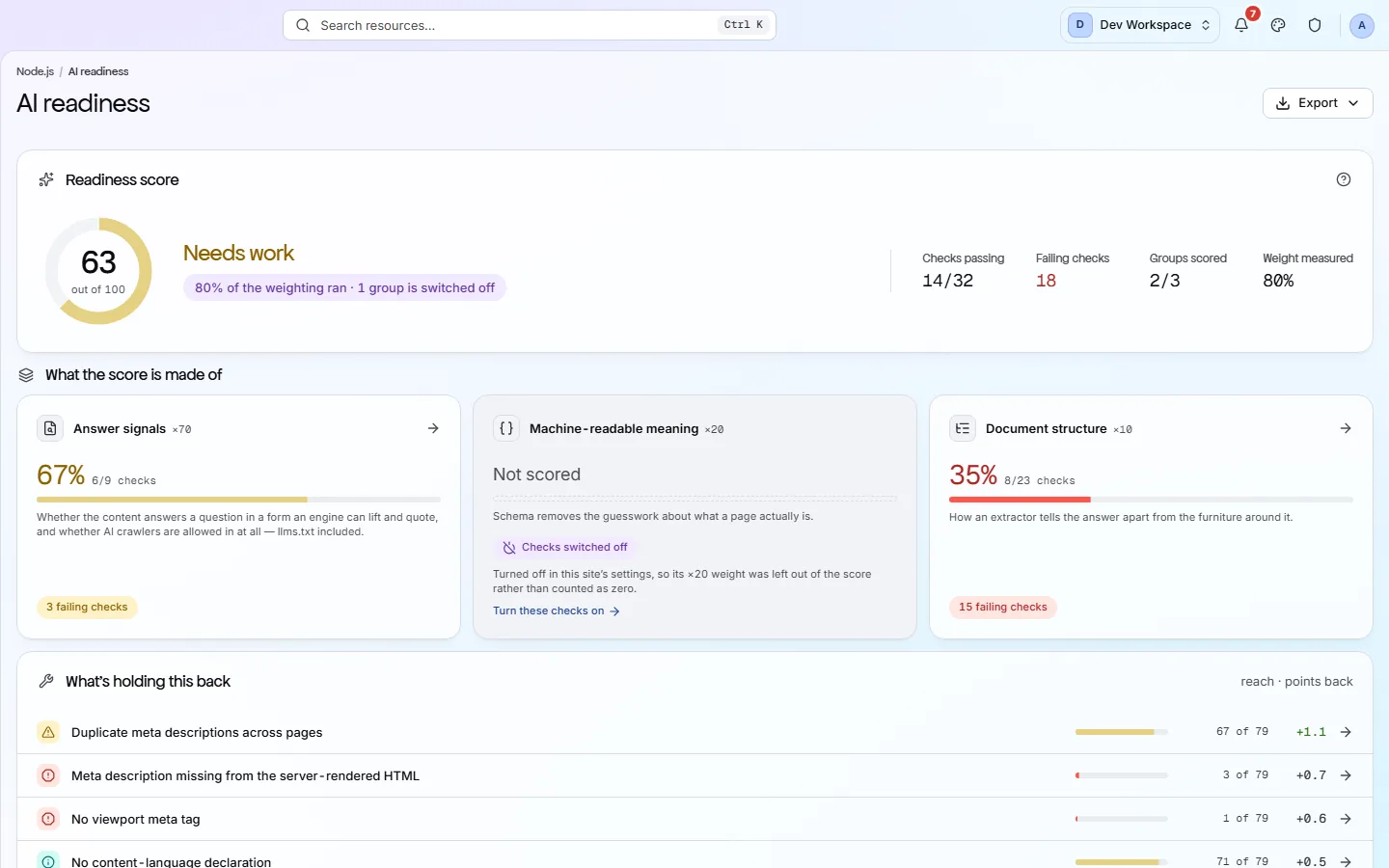
The score is out of 100, built from three weighted groups of checks. Below it, each AI bot is shown as allowed or blocked by your robots.txt.
- Step 3
Fix what holds it back
The failing checks are listed with their fix guides. Start with Answer signals, which carries 70% of the score, then rescan to see it move.
What you get
What you get with it
You see what on your own site you can fix, and which AI bots your rules let in, before you spend time on anything else.
- 01
A score out of 100
The score is built from three groups of checks: how clearly your content answers questions (70%), whether your structured data is valid (20%) and whether your pages have a clear outline (10%).
- 02
18 AI bots, allowed or blocked
PixyScan reads your robots.txt and shows each known AI bot as allowed or blocked. Bots are grouped as Retrieval, On-demand and Training, so you can block model training without leaving AI answers.
- 03
llms.txt, checked
llms.txt is an optional file that lists your most useful pages for AI tools. PixyScan checks that it exists, that it follows the format and that every link in it works.
- 04
The fixes that would raise it most
The failing checks are listed under the score, each with its fix guide. Fix the Answer signals group first, because it carries 70% of the weight.
Which tiers include it
Every tier, Free included.
- The score, the bot list and the llms.txt checks run on every scan, on every tier.
- The AI readiness report downloads on every tier. On Free it leaves out the fix steps.
- Pages that build their content with JavaScript need JavaScript rendering, from Pro up.
What it doesn’t do
- The score does not predict whether an AI tool will quote you. It measures the signals on your site that you control.
- It does not track whether an AI tool mentions your brand.
- Bot access is shown, not scored, because which bots you allow is your choice.
- PixyScan does not write content for you. There is no AI in the product.
Why use it
When it helps
Everyday moments where it saves you time or catches a problem early.
You blocked AI bots and are not sure which
The bot list shows what your robots.txt actually does, bot by bot. You can block the training bots and still allow the ones that fetch pages for AI answers.
Your pages are written for people
Structured data and a clear heading outline tell a machine which text is the answer. The score shows which of those checks you fail.
You publish an llms.txt
PixyScan checks the file's format, and that every link in it leads to a working page.
Where to find it in the app
Take the product tourExplore
AI readiness
AI readiness shows how easily AI tools such as ChatGPT can read your pages and quote them. It is one score out of 100, built from three groups of checks, with a list of what to fix first.
Explore
Crawlability
Crawlability is whether search engines and AI bots can find and reach your pages. This feature shows your robots.txt rules, your sitemaps, your redirects and anything that keeps bots out.
Questions
Common questions
Short answers about tiers, setup and limits.
Does a high score mean AI tools will quote me?
No. The score measures the signals on your site that you control. Whether a tool quotes you depends on the tool, the question and many sources PixyScan cannot see.
Which AI bots does it show?
18 bots from 11 companies, including OAI-SearchBot, PerplexityBot, ChatGPT-User, Claude-User, GPTBot, ClaudeBot, CCBot and Google-Extended. Each is shown as allowed or blocked by your robots.txt.
Should I block the training bots?
That is your choice. Training bots collect pages to train future models. Blocking them does not block the retrieval and on-demand bots that fetch pages for AI answers.
What is llms.txt?
An optional text file that lists your most useful pages for AI tools. Few AI tools read it yet, and search engines do not use it. PixyScan checks it if you publish one.
How is the AI readiness score worked out?
It is the weighted average of three groups of checks: Answer signals (70%), Machine-readable meaning (20%) and Document structure (10%). The AI readiness page in the product tour has a worked example.
Which tiers include AI readiness?
Every tier, Free included.
Other features
All featuresMCP server
Connect your AI assistant to PixyScan, so it answers from your real scan and can test its own fix.
ReadThe audit and the score
PixyScan checks every page against 200+ search, AI and technical checks and gives your site a health score out of 100.
ReadPages, links and images
Browse every page, link and image the scan found, and open any page for its full report.
ReadSee what is wrong with your site
Add your site and get your score, your to-do list and a fix guide for every problem. Free for one site and 500 pages a month, with no time limit.
Nothing to install · Cancel any time