

A release that breaks SEO fails the build
Add one command to your build pipeline and every release is scanned before it goes live. If the score falls below your limit, or a check you named fails, the build fails like any other test.
Does this sound familiar?
Most SEO damage arrives with a code change, and nothing in a normal test run looks for it.
- A framework upgrade removes the meta tags from every page, and every test still passes.
- A template change adds noindex to your product pages. You find out weeks later, from a traffic chart.
- Staging and live results get mixed together, so nobody trusts the numbers.
How it works
How it works, in three steps
Scan every release from your build pipeline, and fail the build when it would break your SEO.
- Step 1
Create a secret key
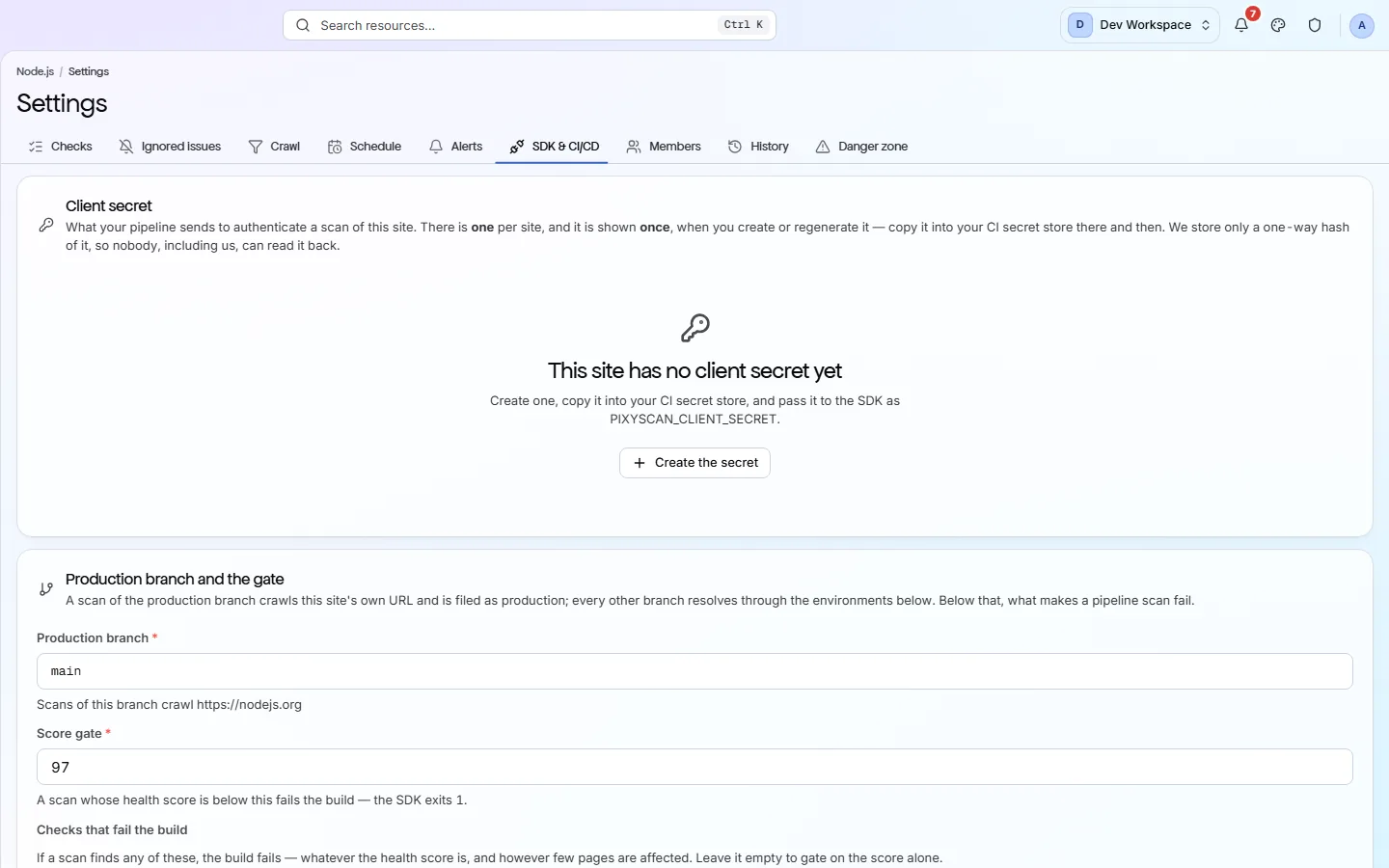
In the site's Settings, open the CLI & CI/CD tab and create a client secret. It starts with sk_live_ and is shown once, so save it in your CI's secret store.
- Step 2
Link branches to addresses
On the same tab, link each branch to the address it deploys to, such as main to your live site. PixyScan scans the address that matches the branch.
- Step 3
Add one command to your pipeline
Add the PixyScan command as a step, with your secret key. It prints the score and exits with code 1 if the scan fails your gate, which stops the build.
What you get
What you get with it
Many site problems arrive with a code change. Catching them in the build keeps them off your live site.
- 01
A pass or a fail, like any other test
The command prints the score and the issues, then exits with a code your pipeline already understands. 0 means the scan passed and 1 means it failed. 2 means bad input, such as a branch with no address linked, and 3 means PixyScan could not be reached. Codes 2 and 3 are setup problems, not problems on your site.
- 02
You decide what fails the build
Set a minimum score (97 by default), a list of up to 200 checks that must never fail, or both. Keep these rules in the app or in a pixyscan-settings.json file next to your code.
- 03
Staging and live kept apart
Link each branch to the address it deploys to. PixyScan scans the address for that branch, and every scan remembers its branch, so a preview's results never mix with your live site's history.
- 04
Each deploy marked with its commit
A scan from your pipeline records the commit it ran for. With Search Console connected, the deploy is marked on your Google clicks trend, so you can line up a change in traffic with a release.
Which tiers include it
Basic, Pro and Enterprise. Not on Free or Hobby.
- The release gate starts on Basic. So does the MCP server.
- On Free and Hobby the CLI & CI/CD tab is visible but locked.
- Scanning a site built with JavaScript needs JavaScript rendering, from Pro up.
- Deploy markers on the search trend and the traffic-drop alert also need Google Search Console connected to the site.
What it doesn’t do
- No GitHub app. Nothing comments on a pull request or blocks a merge by itself.
- A drop in Google clicks never fails a build. The gate reads the scan only.
- No public REST API yet.
- It does not write fixes or change your code.
Why use it
When it helps
Everyday moments where it saves you time or catches a problem early.
Never ship a broken page
Add “Broken internal links and pages” to your fail-on list. The build fails on even one broken internal link, whatever the score.
Start without breaking every build
The default minimum score is 97, and many sites score lower at first. Set it to today's score, then raise it as you fix things.
Find the release behind a change in traffic
With Search Console connected, every deploy is marked on your clicks trend with its commit. If clicks fall sharply in the 3 days after one, you get an alert about a week later.
Where to find it in the app
Take the product tourManage
Settings
Each site has its own settings. They decide which pages are scanned, how often, who gets alerts and who can see the site. Changes apply from your next scan.
Monitor
Changes
The Changes view compares two scans of your site. It shows which problems are new, which you fixed and which are still open, and what changed on each page.
Questions
Common questions
Short answers about tiers, setup and limits.
Which tiers include the release gate?
Basic and above. On Free and Hobby the CLI & CI/CD tab is visible but locked.
What do the exit codes mean?
0 means the scan passed. 1 means it failed your gate. 2 means the input was wrong, such as a branch with no address linked. 3 means PixyScan could not be reached.
Which CI providers does it support?
Any CI that can run Node.js 18 or later. The branch is found automatically on GitHub Actions, GitLab CI, CircleCI, Bitbucket Pipelines and Vercel. Elsewhere, you pass it yourself.
Does it record which commit was deployed?
Yes. It reads the commit on GitHub Actions, GitLab CI, Bitbucket Pipelines, CircleCI, Vercel and Netlify, with a link where the CI gives one, and uses the tag on a tag build as the release. You can set these yourself, or turn it off. It only labels the deploy; the scan and its result do not change.
How long does the step take?
It depends on how many pages the scan covers. The command waits up to five minutes by default.
What goes in pixyscan-settings.json?
It is optional. It can hold minScore, the lowest score the build accepts, and failOnIssues, up to 200 checks that must not fail. Anything left out uses the site's settings in the app.
Can a drop in search traffic fail my build?
No. The gate reads the scan: your score and the checks you named. Search Console figures never change whether a build passes.
Other features
All featuresMonitoring and changes
PixyScan scans your site on a schedule and shows only what changed since the last scan.
ReadSearch Impact
After a fix, PixyScan compares Google clicks to the fixed pages with the rest of your site.
ReadAI readiness
Every scan scores how well AI tools can read your site, and shows which AI bots you allow or block.
ReadSee what is wrong with your site
Add your site and get your score, your to-do list and a fix guide for every problem. Free for one site and 500 pages a month, with no time limit.
Nothing to install · Cancel any time