

Thousands of articles, and the handful that broke last night
Archives do not stay still. Links rot, embeds die, a CMS upgrade rewrites a template, and none of it announces itself on a site with twenty thousand pages.
If any two of these are true, this page is for you
None of them is unusual. They are what happens to a site that ships regularly and is only ever looked at deliberately.
- Links in five-year-old articles point at domains that no longer exist.
- A CMS template change stripped Article schema from everything published after a date.
- Half the archive is more than four clicks from anywhere anyone lands.
- Nobody knows which AI crawlers the site is admitting, and it has become a board question.
What PixyScan does
3 things, specifically
Each one is a mechanism in the running product, not a positioning statement.
- 01
Outbound links grouped by destination
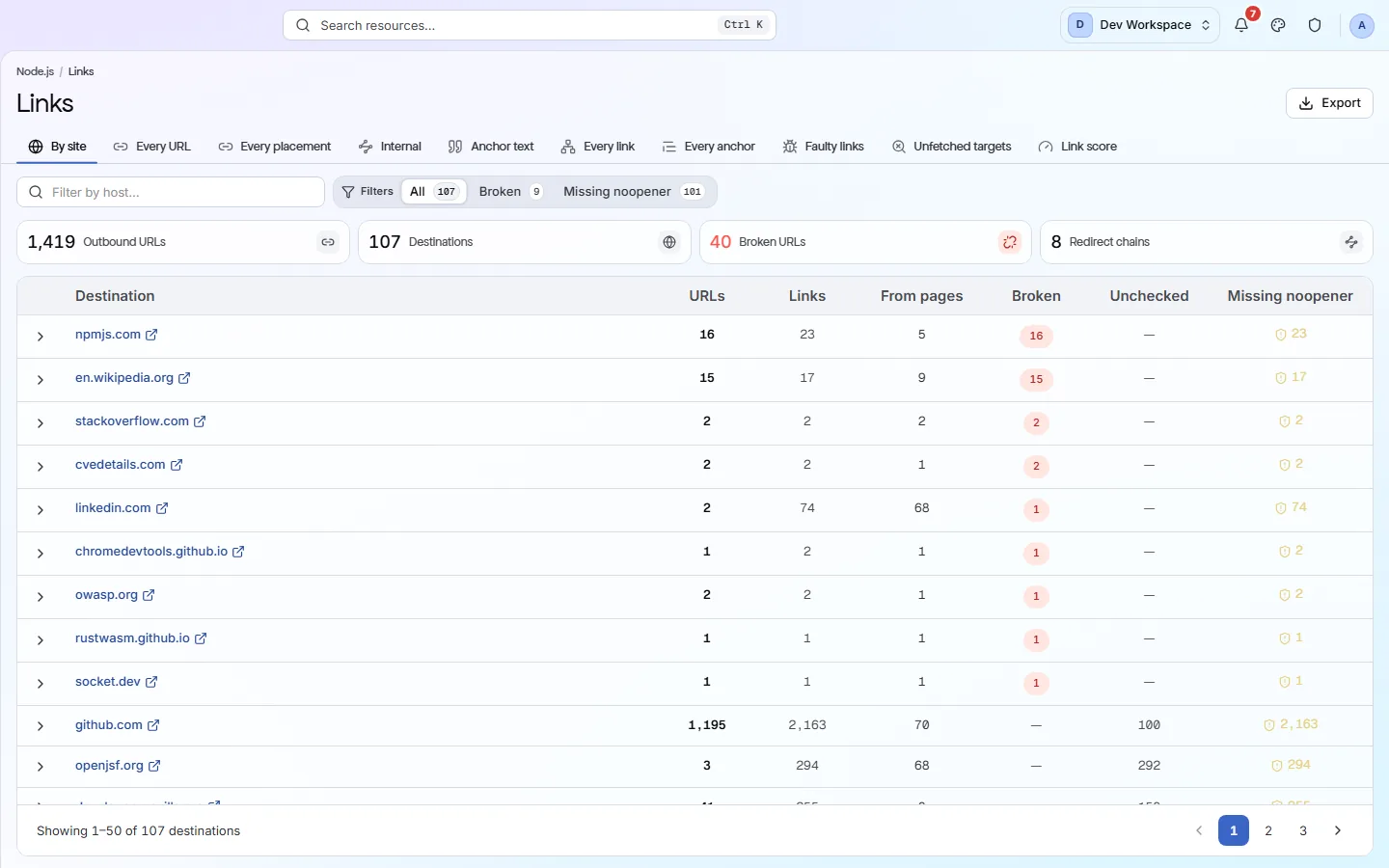
Four hundred rows become the nine sites you actually link to, with every URL that is broken, or missing rel=noopener, called out. Grouping is what makes an archive's link rot reviewable at all.
- 02
Structure as a shape
Largest sections, deepest path, click depth distribution, and a treemap. On an archive this is the fastest way to find a section nobody meant to keep publishing.
- 03
AI crawler access, stated plainly
Every scan records allow, disallow or not-set for each AI crawler in your robots.txt, classed by whether the bot is there to retrieve, to fetch on demand, or to train. We report it; the policy stays yours.
How it fits your week
Day one, then every week after
When you would actually open it. A tool you have to remember is a tool that gets forgotten, so most of this runs without you.
- Step 1
Day one: the archive, inventoried
Set a budget that covers the archive, run the first scan, and go straight to Links grouped by destination. The domains that no longer exist are at the top by count. Then read the Structure depth distribution for how much of the archive is beyond anyone's reach.
- Step 2
Every week: what the CMS did
A weekly schedule catches template changes across everything published since the last run. A new finding in the structured data discipline at high reach is the Article schema being dropped by a template edit, and it is one week old rather than a year.
- Step 3
Every month: bot access, stated for the board
The AI crawler matrix on the Crawlability screen is the answer to “which AI crawlers are we admitting”, by bot and by class. Read it once a month, or whenever the policy discussion comes back, and export the robots analysis if the answer needs to travel.
Worth knowing
- Article and Breadcrumb schema validated per type rather than merely detected.
- Reading level scored against the audience the page is written for.
- hreflang pairs and x-default checked, for archives that run in several languages.
- Every scan keeps its own report, so you can read the archive as it was on any past run.
What it will not do for you
- Link checking is a HEAD request budget on your plan - a very large archive may need more than the smaller plans include.
- No content quality, plagiarism or editorial scoring. Readability is a formula, not an opinion.
Above the signup button on purpose
What is different four weeks later
Each of these is something you could check, not something you would have to take on trust.
- Outbound link rot across twenty thousand articles is a list grouped by the nine domains that account for most of it.
- A template change that strips Article or Breadcrumb schema is caught within a week with the affected date range visible in the URLs.
- The share of the archive beyond three clicks is a number, and its change over time is a chart.
- The AI crawler policy is something you can read off a screen rather than infer from a robots.txt nobody remembers editing.
Before you ask
Things people in your position ask first
Plans, edges, and the honest answer to the question this page is most often found by.
How large an archive can it handle?
Up to the plan's pages per scan: 10,000 on Basic, 15,000 on Pro and unlimited by contract. For an archive larger than that, exclusions let you crawl the sections that matter each run, or Enterprise sets the budget you need.
Does it check the outbound links on every article?
Yes, on paid plans, with a HEAD request budget that scales with the plan - 50,000 a month on Hobby, up to a million on Pro. A very large archive may need Pro or a contract to check every link every run.
Does it score writing quality?
No. Readability is a formula against the audience a page is written for, and it is one signal among many. Nothing here is an editorial judgement, and there is no plagiarism or originality check.
The screens and capabilities behind this
See what is actually on your site
Point PixyScan at a URL and read the first report in a few minutes. The free plan covers one site and 500 URLs a month - enough to find out whether any of this is true.
No card required · 500 URLs a month on the free plan