

Every client site on one schedule, with a report you can send
The work is the same on every account and the reporting is the part that eats the margin. Put each site on a schedule, let the crawls happen without anyone remembering, and export the run.
If any two of these are true, this page is for you
None of them is unusual. They are what happens to a site that ships regularly and is only ever looked at deliberately.
- Twelve clients, twelve manual audits, and a week of every month spent formatting them.
- A client's developer changes something and you find out at the next check-in.
- Contractors need one site, and the only way to give them that is to give them everything.
- The monthly report has to show progress, and “we fixed things” is not progress.
What PixyScan does
3 things, specifically
Each one is a mechanism in the running product, not a positioning statement.
- 01
One workspace, many sites, roles per site
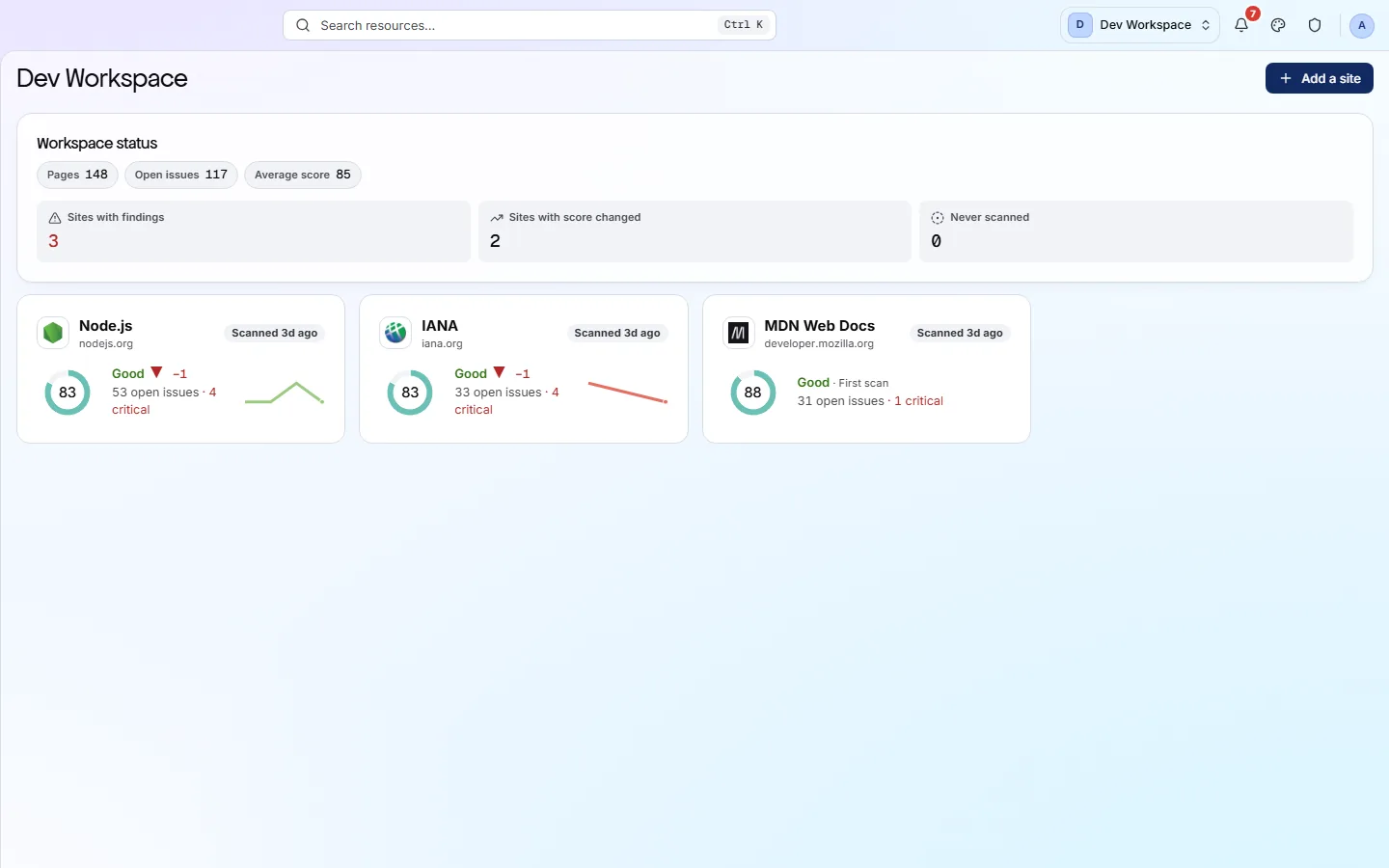
A workspace holds sites, members and the subscription. Roles are set per workspace and per site, so a contractor gets the one account they are working on and nothing else you look after.
- 02
Scheduled crawls nobody has to remember
Daily, weekly or monthly per site, in your own timezone. Larger plans run several scans at once, which is what stops a portfolio re-crawl from queueing behind itself.
- 03
A report with your name on it
Any completed scan renders as a PDF in three cuts - the problems, the strengths, or both. On Pro and above the report carries your brand: co-branded, or Agency mode, which takes the PixyScan mark off the rendered report entirely. Because every run is compared with the last, the report has a delta in it rather than a list.
How it fits your week
Day one, then every week after
When you would actually open it. A tool you have to remember is a tool that gets forgotten, so most of this runs without you.
- Step 1
Day one: one workspace, every client as a site
Create the workspace, add each client's domain as its own site, and give each a page budget sized to the site rather than the plan. Put contractors on the sites they work on; keep the workspace role for your own team.
- Step 2
Every week: schedules run, you read the New columns
Each site on a weekly schedule at a quiet hour produces a Changes screen per client. The portfolio view ranks sites by health, so the Monday read is top-down: whichever client's site moved most is first.
- Step 3
Every month: the report is an export
The Full PDF of each site's latest run, with its delta from the previous month, is the client report. Set the branding profile once - Agency mode puts your logo on it and takes ours off - and every export after that comes out as your document. Strengths cut for the client who wants reassurance; Issues cut for the one whose developer is doing the work.
Worth knowing
- Up to 25 sites on Pro; unlimited by contract on Enterprise.
- URL credits are pooled across the workspace rather than fenced per site.
- The issue list, the pages failing one check and a page's full report all export to CSV.
- History runs to two years on Pro, so an annual review has something to look back at.
What it will not do for you
- There is no scheduled report delivery. The branded PDF is a download you send, not something that arrives in a client's inbox on the first of the month.
- There is no client-facing login that hides the rest of your workspace; access is by role.
Above the signup button on purpose
What is different four weeks later
Each of these is something you could check, not something you would have to take on trust.
- A client's developer breaking something is discovered by you, that week, rather than by the client at the check-in.
- The monthly report takes the time to download it, and contains a delta rather than a list.
- A contractor sees one client's site and nothing else in the workspace.
- Twelve manual audits become twelve scheduled runs and one morning of reading.
Before you ask
Things people in your position ask first
Plans, edges, and the honest answer to the question this page is most often found by.
How many client sites can one workspace hold?
Five on Basic, twenty-five on Pro and unlimited by contract on Enterprise. URL credits are pooled across the workspace - 20,000 a month on Basic, 125,000 on Pro - so a small client site does not need its own allowance.
Can each client have their own workspace instead?
Yes, and some agencies do it that way for billing separation. Each workspace is its own subscription, its own member list and its own credit pool, and you switch between them from the rail.
Can the report carry our logo?
Yes, on Pro and above. Under Reports in the workspace there are three modes: PixyScan, co-branded, and Agency - which takes the PixyScan mark off the rendered report entirely. Upload the logo, set the colours, and write the cover block and the footer. Saved profiles survive a downgrade, so a lapsed month does not lose the branding.
The screens and capabilities behind this
See what is actually on your site
Point PixyScan at a URL and read the first report in a few minutes. The free plan covers one site and 500 URLs a month - enough to find out whether any of this is true.
No card required · 500 URLs a month on the free plan