

Make sure search engines understand your pages
Structured data is a small block of code (JSON-LD) that tells search engines what a page is: a product, an article, an event, a business. The Schema view lists every block on your site, which ones are broken, and which fields they are missing.
- schema types recognised
- 30+
- schema types recognised
- views: overview to faults
- 4
- views: overview to faults
- read on every page
- JSON-LD
- read on every page
What it shows you
Your structured data, checked block by block
Search engines use structured data to show rich results: star ratings, prices, FAQs and event dates right in the search page. A broken block gets none of that.
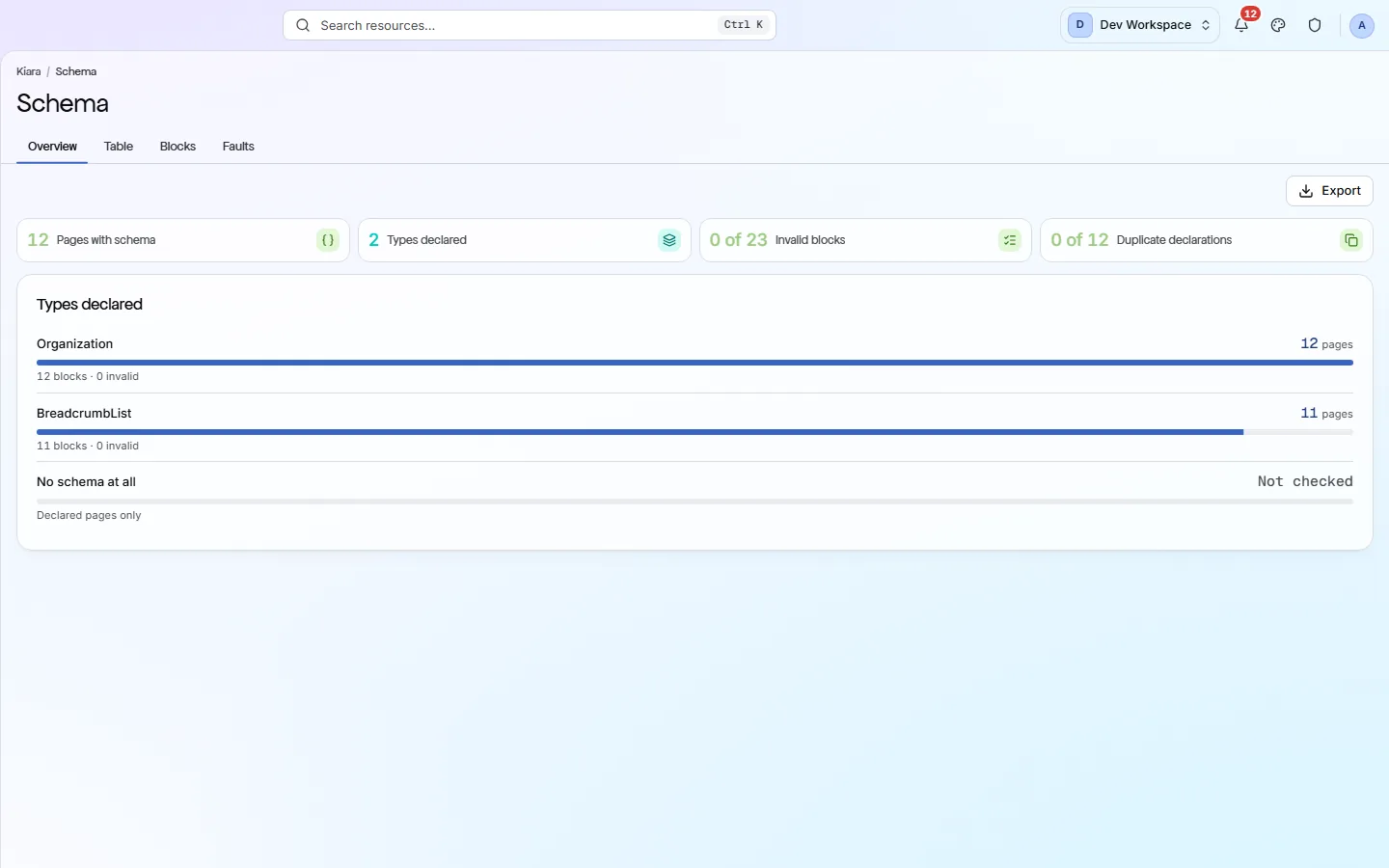
Types declared
Each schema type on your site, such as Product, Article or BreadcrumbList, with how many pages use it and how many of its blocks are invalid.
Invalid blocks
Blocks that break the rules, for example a Product with no name or an Event with no start date. Shown as “20 of 30” so you see the share.
Duplicate declarations
Pages that declare the same type more than once, which can send search engines mixed signals.
Faults, grouped
Every problem the validator found, grouped by message, with how often it occurs, on how many pages and in which types.
Required fields
What each type must include
PixyScan checks each block for the fields its type needs. These are some of the most common.
- Product
name,imageanddescription, plus an Offer withpriceandpriceCurrency.Shoppers will not see your price or stock in search results.
- Article
headline,authoranddatePublished.Your article may lose its date and author in search results.
- Organization
nameandurl.Search engines cannot tie your pages to your brand as easily.
- LocalBusiness
nameandaddress.Your business details may not show for local searches.
- Event
name,startDateandlocation.The event will not appear with its date and place.
- FAQPage
mainEntity, holding each question and its answer.Your questions will not be read as an FAQ.
What it finds
Schema problems and their fixes
Each check only applies to types you actually declare. A site with no Product schema is never marked down for Product.
- Important
Product schema is missing its Offer
Without a price and currency, search engines cannot show your product's price.
How to fix: Add an
offersblock withprice(orlowPrice) andpriceCurrencyto the Product. - Important
Organization or LocalBusiness block is faulty
This block tells search engines who runs the site. A broken one weakens that link.
How to fix: Open the Faults tab, find the named field, such as
urloraddress, and add it to the block. - Important
FAQPage questions are broken
Questions without a proper answer entry are not read as an FAQ.
How to fix: Give each Question an
acceptedAnswerholding an Answer with itstext. - Standard
Breadcrumb entries are faulty
Breadcrumbs show your page's place in the site in search results. Faulty entries are dropped.
How to fix: Add the
itemListElementlist to the BreadcrumbList, with one entry for each step from the homepage to this page. - Standard
Article is missing its author or date
Search engines use these to judge how fresh and trustworthy an article is.
How to fix: Add
authoranddatePublished(in ISO date format, such as 2026-10-05) to the Article.
Inside the app
From a summary down to each fault
Every type you declare, with its page count and how many blocks are invalid.
Click around: it is a working copy of the screen, filled with our test site's data.
Your health score
Broken schema costs points. Missing schema does not.
A check only counts when you declare that type and the block is faulty. The Structured Data category counts at 0.4 of its full weight, because it helps how you appear in search more than whether you appear.
How the score works- structured data checks
- 22
- structured data checks
- category weight in the score
- 0.4×
- category weight in the score
- points for types you never use
- 0
- points for types you never use
- schema.org types recognised
- 30+
- schema.org types recognised
The checks behind this screen
Check categories shown here
These groups of checks feed the numbers on this screen. Each one is explained on the score page.
Structured Data
22 checksStructured data is code on a page that tells search engines exactly what the page is, such as a product, an article or an FAQ. These checks validate it for 31 schema.org types, because markup with errors cannot earn rich results.
FAQ
Common questions about this feature
Which formats does PixyScan read?
JSON-LD, the format Google recommends, including `@graph` blocks and arrays. Microdata and RDFa are not read.
Will it tell me which schema to add?
It checks the schema you have. It does not mark you down for a type you never declared, so add the types that fit your pages, then use this view to check them.
Can I export the faults?
Yes, from Hobby up. The Faults tab exports CSV, Excel or JSON. The other tabs export CSV.
Where do I see one page's schema?
Click any URL in the Table. It opens that page's own report on its Schema tab, with each block as declared.
Continue the product tour
Previous and next features
Features follow the order of the app’s menu. See the full list to jump to any of them.
See what is wrong with your site
Add your site and get your score, your to-do list and a fix guide for every problem. Free for one site and 500 pages a month, with no time limit.
Nothing to install · Cancel any time