

A before, an after, and the diff between them
A migration is the one event where “what changed” is the entire question. Scan the old site, scan the new one, and read the difference instead of arguing about it.
If any two of these are true, this page is for you
None of them is unusual. They are what happens to a site that ships regularly and is only ever looked at deliberately.
- You are moving platforms and the redirect map is a spreadsheet nobody has verified.
- The old site's URL inventory does not exist anywhere except in the old site.
- Something will break during cutover and it will be found by a customer.
- Six weeks later, traffic is down and the cause could be any of two hundred changes.
What PixyScan does
3 things, specifically
Each one is a mechanism in the running product, not a positioning statement.
- 01
A complete inventory of the old site
Every reachable URL with its status, depth and findings, before you touch anything. That inventory is the thing a migration is checked against, and most teams do not have one.
- 02
Redirect chains and loops, found not guessed
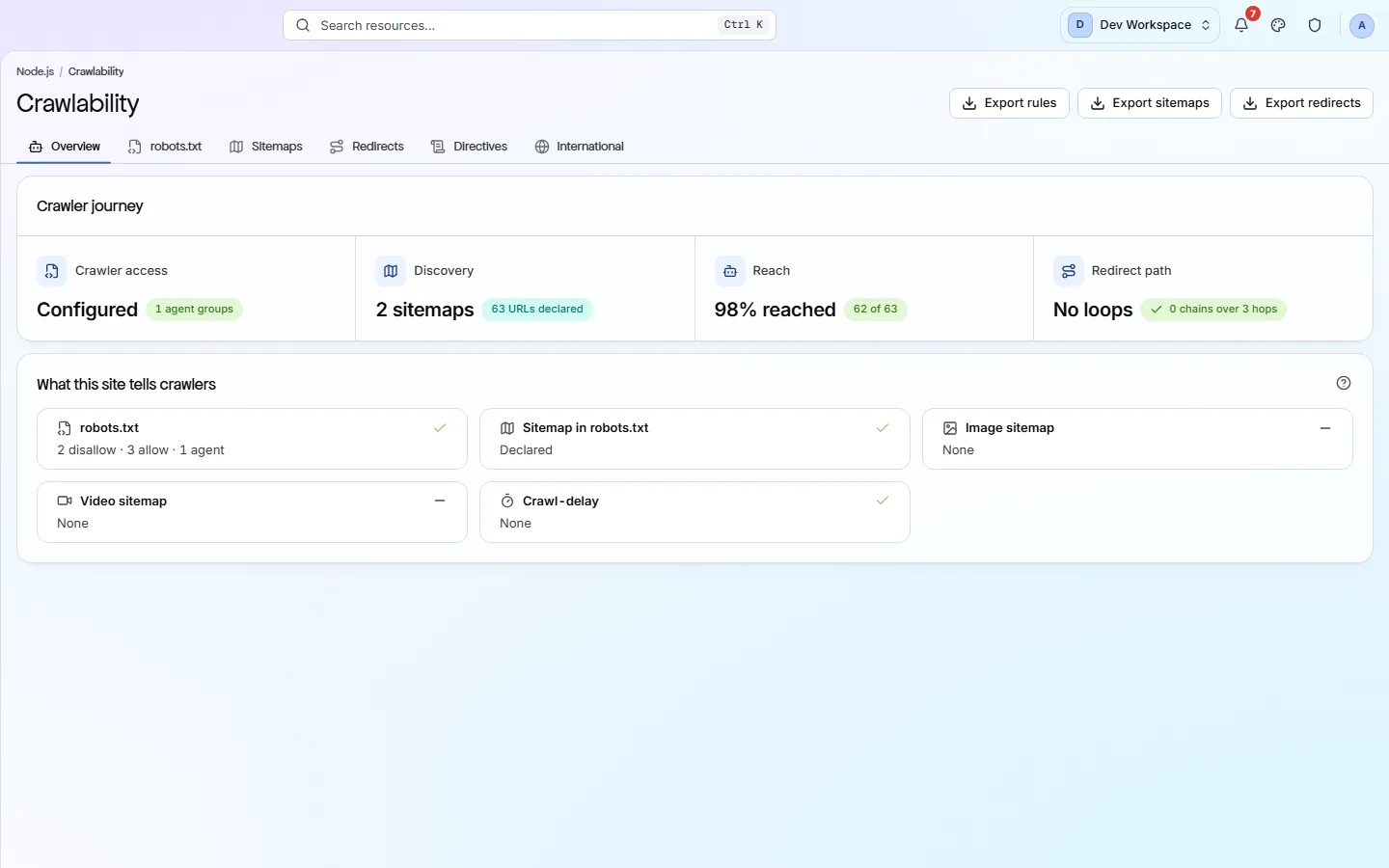
The crawl walks the redirects rather than reading your map. Chains, loops and dead ends surface as findings with the URLs attached.
- 03
The two sites, compared
Run the new site as its own branch or its own site and read the diff: what resolved, what appeared, and which of the old inventory the new crawl never reached.
How it fits your week
Day one, then every week after
When you would actually open it. A tool you have to remember is a tool that gets forgotten, so most of this runs without you.
- Step 1
Before: inventory the old site
Crawl the site as it is with a budget that covers it, and export Pages - every URL, its status and depth - and the sitemap-versus-crawl lists from Crawlability. That inventory is what the migration will be checked against, and it is the document most migrations do not have.
- Step 2
During: crawl the new site as its own branch or site
Point a second site or a mapped branch at the staging host and crawl it. Redirect chains and loops surface as findings with the URLs in them, because the crawler follows the redirects rather than reading your map. Compare the two Pages exports for what the new crawl never reached.
- Step 3
After cutover: read the Changes screen daily for a fortnight
Scan production daily. New findings in the first days are the migration's leftovers - broken internal links, canonicals pointing at the old host, a section that lost a click of depth. Structure's depth distribution before and after is where a migration usually loses its long tail.
Worth knowing
- Sitemap against crawl: the Pages screen filters to sitemap-only and not-in-sitemap URLs, and Crawlability reads each sitemap file's coverage.
- robots.txt and sitemaps read together, because they contradict each other during a migration constantly.
- Click depth before and after, which is where a migration usually loses its long tail.
- Export both inventories to CSV for the redirect map you are going to have to build anyway.
What it will not do for you
- No automatic redirect map generation - this finds the problems, it does not write the rules.
- No traffic or ranking data, so “did it work” in revenue terms is still your analytics tool's job.
Above the signup button on purpose
What is different four weeks later
Each of these is something you could check, not something you would have to take on trust.
- A complete before-inventory, exported, against which every after-question can be answered.
- Redirect chains, loops and dead ends found by walking them rather than by trusting the map.
- Old URLs the new site never reaches, as a list, before a customer finds one.
- The six-weeks-later traffic question answered by two runs and a diff rather than by two hundred candidate changes.
Before you ask
Things people in your position ask first
Plans, edges, and the honest answer to the question this page is most often found by.
Can it compare the old site and the new one directly?
Crawl each as its own site or branch and compare the exports; on the same branch, the first post-cutover scan's Changes screen is the direct diff against the last pre-cutover one. There is no side-by-side two-site view in the product.
Will it generate the redirect map?
No. It gives you the inventory to build it from and finds the chains and loops in the one you wrote. Writing the rules is still yours.
How do I stop the staging crawl becoming production's baseline?
Map the staging branch to its host under SDK & CI/CD, or add staging as a separate site. Scans are compared only with the previous scan on the same branch, so a correctly filed staging run cannot touch production's trend.
The screens and capabilities behind this
See what is actually on your site
Point PixyScan at a URL and read the first report in a few minutes. The free plan covers one site and 500 URLs a month - enough to find out whether any of this is true.
No card required · 500 URLs a month on the free plan