

Find what is hurting your website in search and AI
PixyScan checks every page of your site for search engines and AI tools, and tells you what to fix first. It stops a release that would break your SEO, shows what changed after each scan, and shows how your fixed pages did in Google.
- Free for one site and 500 pages a month
- Nothing to install
- It only reads your site
Your score, your to-do list and what changed
What you get
Four things PixyScan does for your site
PixyScan checks your site on every release, stops the ones that break SEO, and shows how your fixed pages did in Google afterwards.
- 01 · Before a release
Catch it before it ships
One command in your build pipeline scans each release. If the score falls below your limit, the build fails and the problem never reaches your live site.
- A score gate, 97 unless you change it
- Up to 200 checks that must never fail
- Staging and live results kept apart
- 02 · After every scan
Know what changed
Every scan is compared with the last. You read what is new, what you fixed and what is still open, and an alert tells you when the score drops.
- Scans that run daily, weekly or monthly
- New, Resolved and Still open, sorted apart
- Alerts by email, Slack or webhook
- 03 · After a fix
See how your fixes did
Connect Google Search Console and PixyScan compares the pages you fixed with the rest of your site, so you can see how they did in Google afterwards.
- Fixed pages compared with the rest of your site
- Deploys marked on your clicks trend
- An alert when clicks drop after a deploy
- 04 · For AI search
Be readable by AI search
A score out of 100 for how well ChatGPT, Perplexity and Claude can read your site, and a list of the AI bots you allow or block.
- An AI readiness score out of 100
- 18 AI bots, each shown as allowed or blocked
- An MCP server for your own AI assistant
Behind all four
- A fix guide for every checkEach of the 200+ checks comes with a guide written by a person: what the problem is, why it matters and how to fix it.
- Reports with your name on them61+ report kinds in five formats. From Pro, your own logo and colours go on every one.
- A workspace for your teamGive each person a role, and each client or contractor access to their own site and nothing else.
PixyScan is not a keyword or backlink tool. It watches your own site: every page, on every scan and every release.
A release that breaks SEO fails the build
A framework upgrade removes the meta tags from every page. A template change adds noindex to your product pages. No test notices, and you find out weeks later from a traffic chart.
- One command in your pipeline scans the address for that branch and returns a pass or a fail, like any other test.
- You decide what fails the build: a score below your limit, any of up to 200 named checks, or both.
- Staging and live results never mix, because every scan remembers its branch.
Finds the branch by itself on
- GitHub Actions
- GitLab CI
- CircleCI
- Bitbucket Pipelines
- Vercel
See how your fixed pages did in Google
You fixed 40 pages. Did it matter? An audit can tell you they are fixed. It cannot tell you what happened next.
Connect Google Search Console with read-only access. After a fix, PixyScan compares Google clicks to the fixed pages with the rest of your site: 28 days before and 28 days after. You read one plain sentence.
- Every deploy from your pipeline is marked on your clicks trend, with its commit.
- If clicks fall sharply in the days after a deploy, you get an alert about a week later.
- Each page and each problem shows its Google clicks, so you can fix the busiest pages first.
Good to know: This is a comparison with the rest of your site, not proof of cause. Google updates and seasons move the numbers too.
See Search ImpactBe readable by AI search
Ready for AI search, and for your own AI assistant
These are two different things, and PixyScan does both. It checks whether AI tools can read your site, and it lets your own assistant read your results.
Find out whether AI search can read your site
ChatGPT, Perplexity and Claude answer questions by reading pages like yours. Every scan gives your site an AI readiness score out of 100, shows which of 18 AI bots your robots.txt allows or blocks, and checks your llms.txt file.
Good to know: The AI readiness score does not predict whether an AI tool will quote you. It measures the signals on your site that you control.
See AI readiness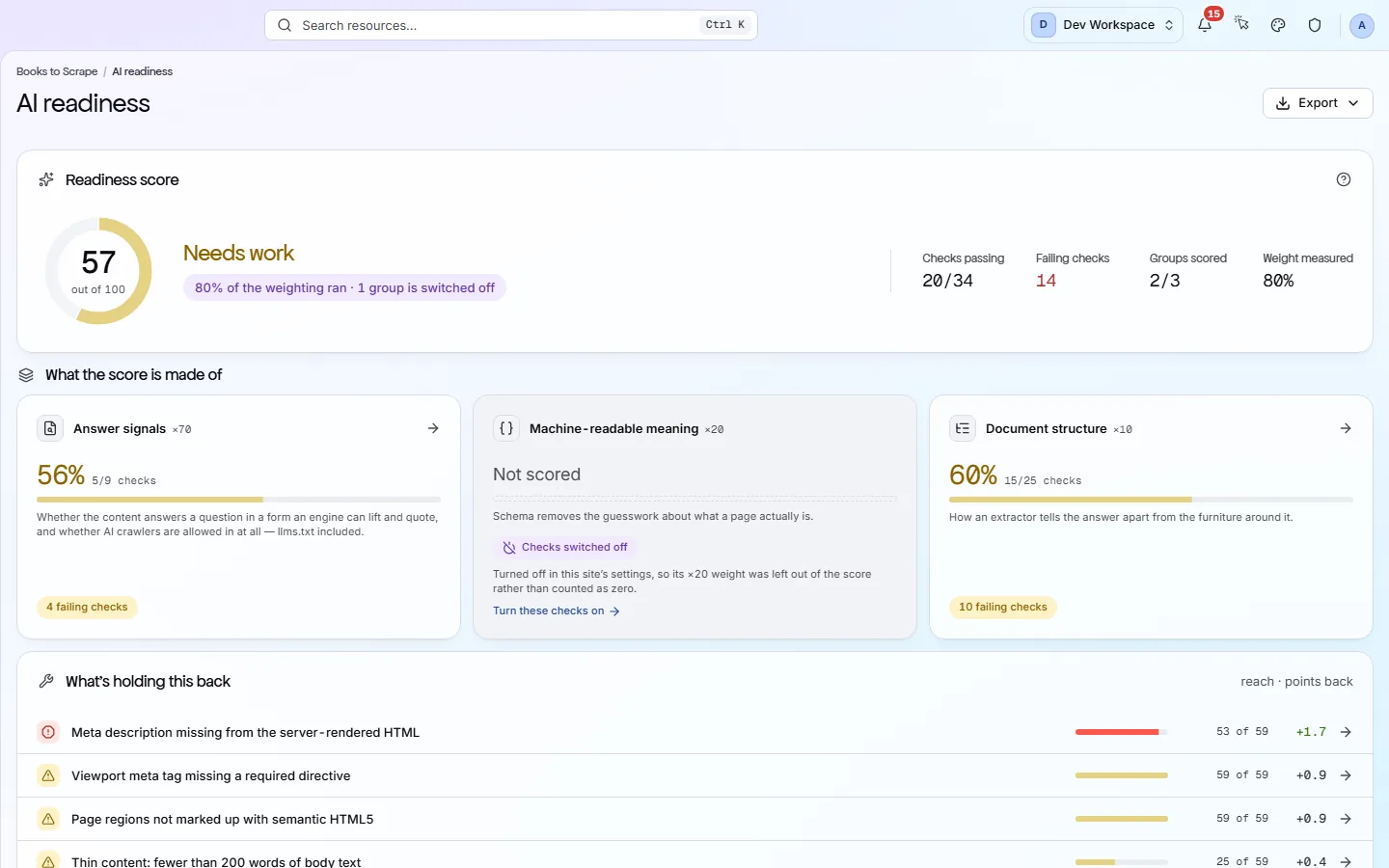
Let your AI assistant fix it, then prove the fix passed
Connect PixyScan to Claude, or any assistant that supports MCP. Ask what to fix first and it answers from your real scan: the problems, the pages affected and the fix guide for each.
- You sign in through your browser, so no password or key is pasted into the assistant.
- A coding assistant can make the fix, then run the PixyScan check to test it.
- It reads your results. It never changes your site.
Why PixyScan
How PixyScan is different
A long list of problems is not much help on its own. PixyScan tells you what matters, what changed and how to fix it.
See only what changed
New problems hide in a long list.
New, fixed and open problems are shown apart.
Each scan is compared with the last one. New problems stand out, instead of hiding in a long list you have already read. From Hobby.
↳The Changes view
Keep staging apart from live
Staging and live results get mixed together.
Each branch keeps its own history.
A scan started by your developers remembers which branch it checked. Test results never mix with your live site's history. From Basic.
↳Settings → CLI & CI/CD
Know how big each problem is
You don't know which problem to fix first.
Every problem shows how many pages it hits.
Every problem shows how many pages it affects, such as 120 of 120. A problem on every page usually comes from one template, so one fix clears it everywhere.
↳The Issues view
See which AI bots you allow
You do not know which AI bots can reach you.
Each AI bot is shown as allowed or blocked.
Your robots.txt file tells bots where they may go. PixyScan reads it and shows whether each of 18 known AI bots, such as the ones behind ChatGPT and Claude, is allowed or blocked.
↳The Crawlability view
A fix guide next to each problem
You search the web for how to fix it.
A plain fix guide sits next to each problem.
All 200+ checks come with a plain guide that explains the problem and how to fix it, with examples. No more searching the web for answers.
↳Any issue, opened
A score you can understand
The score is a mystery number.
Every problem shows the points it costs.
Your score is out of 100. Serious problems and problems on many pages cost more points. Every problem shows what it costs, so the score is never a mystery.
↳How the score works
Who it's for
Made for sites that change every week
SEO teams, agencies and developers get the depth they need. Everyone else gets plain words: every problem is explained, with the steps to fix it.
SEO teams
Track your site's health over time. After each scan you read what is new, what your team fixed and which fix wins back the most points.
Agencies and freelancers
Check all your clients' sites in one place, give each client access to their own site, and send reports with your own logo.
Developers
Scan the site before each release and stop the build if the score drops, so new problems never go live.
Business owners and marketers
You want more people to find your site, but you are not a search expert. PixyScan tells you what is wrong in plain words and how to fix it.
Pricing
Start free. Pay only when you grow.
One page scanned uses one URL credit. Every tier comes with credits each month, and 1,000 extra cost $9. Paying yearly gets you 2 months free.
- Free$0/month500 pages a month · 1 siteTry PixyScan on one site, with no time limit.
- Team members
- 1
- History kept
- 30 days
- Hobby$19/month5,000 pages a month · 2 sitesFor one or two sites you want checked on a schedule.
- Team members
- 2
- History kept
- 180 days
- RECOMMENDEDBasic$39/month20,000 pages a month · 5 sitesFor small teams who want to check the site before every release.
- Team members
- 3
- History kept
- 1 year
- Pro$129/month125,000 pages a month · 25 sitesFor agencies and big sites, including sites built with JavaScript.
- Team members
- 10
- History kept
- 2 years
- EnterpriseLet's talkUnlimited pages · Unlimited sitesFor very large sites or teams that need custom limits.
- Team members
- Unlimited
- History kept
- 10 years
Questions
Common questions
Short answers to the questions that come up first. There are more on the FAQ page.
Do I need to install anything?
No. PixyScan reads your site from the outside, just like a search engine. There is no plugin, no script tag and no code to add. You sign up, type in your site's address and start a scan.
Will scanning slow down or harm my site?
No. PixyScan only reads your pages, like a visitor would. If your server is small and struggles during a scan, turn on Rate limit healing in the site's Settings (Crawl tab). PixyScan then fetches one page at a time, with a pause you choose.
Do I need to be an expert to use it?
No. Every problem is explained in plain words: what it is, why it matters and how to fix it, with examples. Problems are sorted biggest first, so you always know where to start.
Is there really a free version?
Yes. Free never runs out. It covers one site, one person and 500 pages a month, and runs 181 of the 200+ checks. The 21 it skips (broken and redirecting external links, broken images and the page-speed checks) start on Hobby. Each account can have one free workspace.
What is a URL credit?
One page scanned uses one URL credit. A scan of 400 pages uses 400 credits. Each tier comes with credits every month: 500 on Free, 5,000 on Hobby, 20,000 on Basic and 125,000 on Pro. They are shared by all the sites in your workspace.
Can I cancel at any time?
Yes, with no fee and no notice period. Cancel from the Billing view or by emailing support. Everything keeps working until the end of the period you paid for. After that your workspace is locked: you can still read your sites, scans and reports, but you cannot start new scans.
See what is wrong with your site
Add your site and get your score, your to-do list and a fix guide for every problem. Free for one site and 500 pages a month, with no time limit.
Nothing to install · Cancel any time